This is another beta version of Rescatux. The last Rescatux beta was released on January 2020. That’s about one month ago.
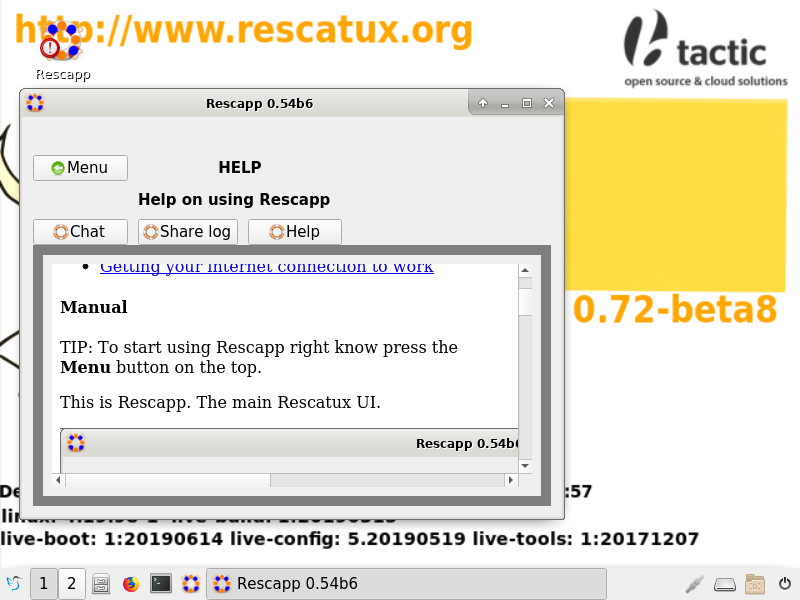
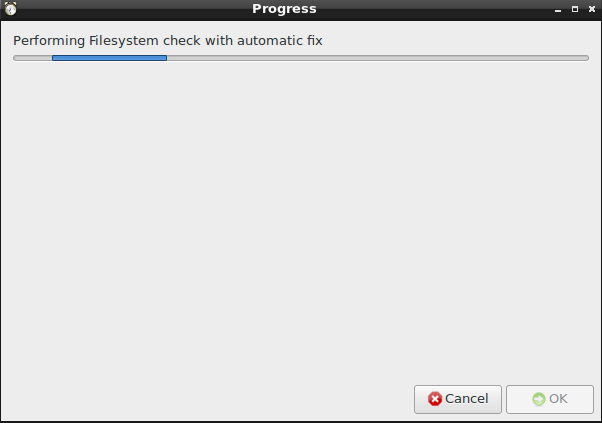
This new version has many improvements. AFD Scanning technology has been improved with the United States of Spain gimmick. Rescapp now has proper logos, desktop icons and a window icon. Non English translations were removed from internal documentation. Many plugin documentations have been update to match 2019 gui. Finally the most important improvement is that Rescapp help is shown right at the Rescapp startup.
This is another beta version of Rescatux. The last Rescatux beta was released on December 2019. That’s about one month ago.
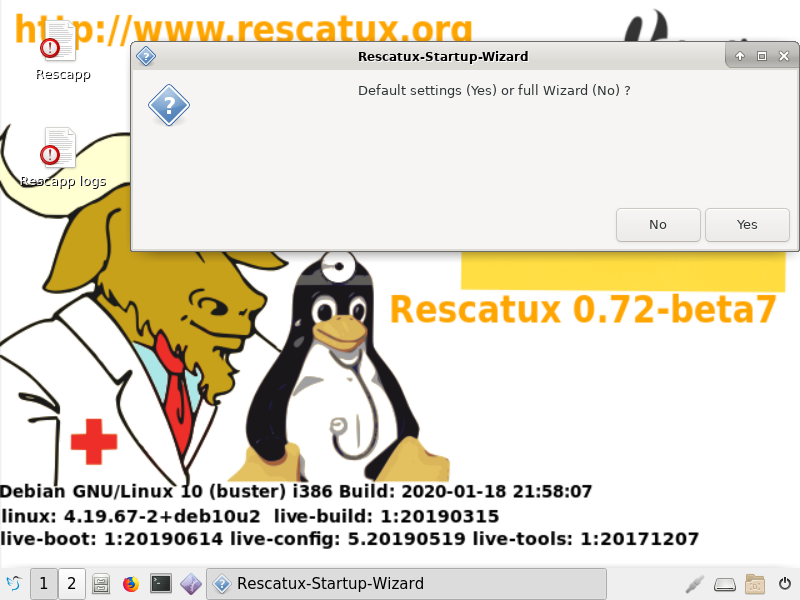
This new version has two major improvements. Startup wizard has an option to just use default values and skip all the questions. The second one is that options (the ones which hadn’t been reworked yet) have been reworked so that they manage devices like hard disks not being found properly.
Rescatux 0.72 beta 7 with the improved startup wizard
What’s new on Rescatux
Startup wizard has an option to just use default values
New 2019 December background
Enable customizations thanks to optional make_common.custom file.
What’s new on Rescapp
Removed no longer needed sip module dependency
Completed handling of not found partitions of files
This is another beta version of Rescatux. The last Rescatux beta was released on November 2019. That’s about three weeks ago.
This new version has two major improvements. Extra xorg packages have been added so that more videocards are supported in Rescatux without having to use the non-free Rescatux. The second one is that many options have been reworked so that they manage devices like hard disks not being found properly.
This is another beta version of Rescatux. The last Rescatux beta was released on October 2019. That’s about three weeks ago.
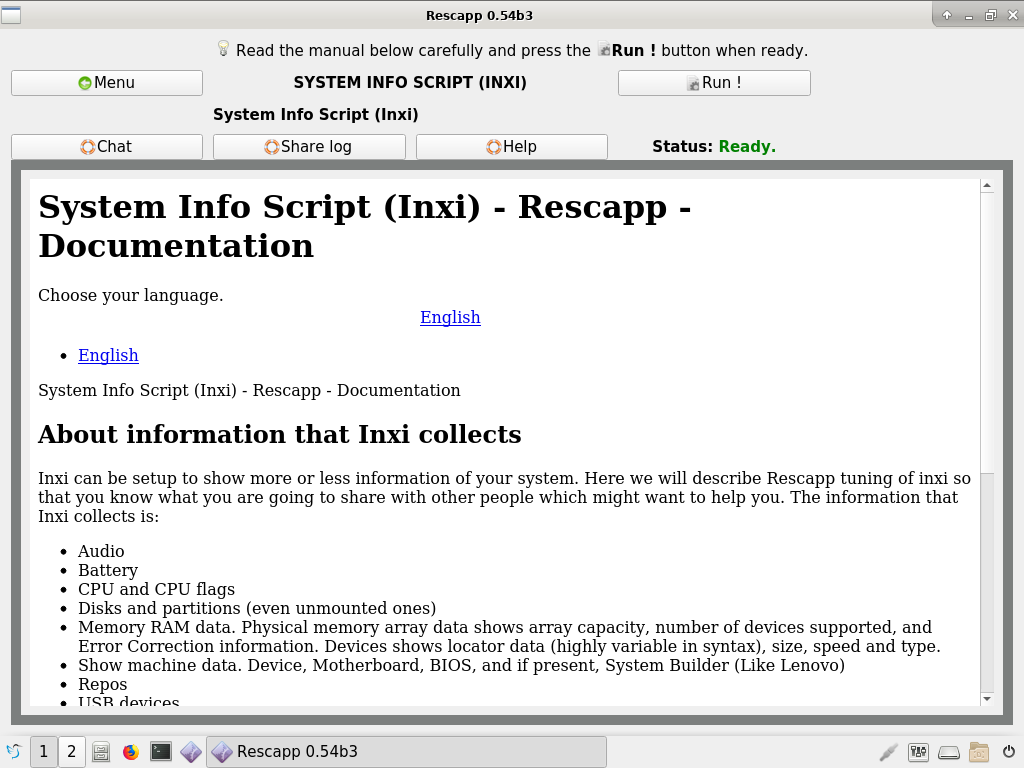
This new version checks for Gparted, Photorec and Testdisk before running them. A new option called System Info Script based on Inxi has been added. In order to improve usability a generic documentation page for non-documented options has been added. Finally bootinfoscript has been updated to use Debian’s package instead of the outdated custom embedded bootinfoscript.
This is another beta version of Rescatux. The last Rescatux beta was released on October 2019. That’s about two weeks ago.
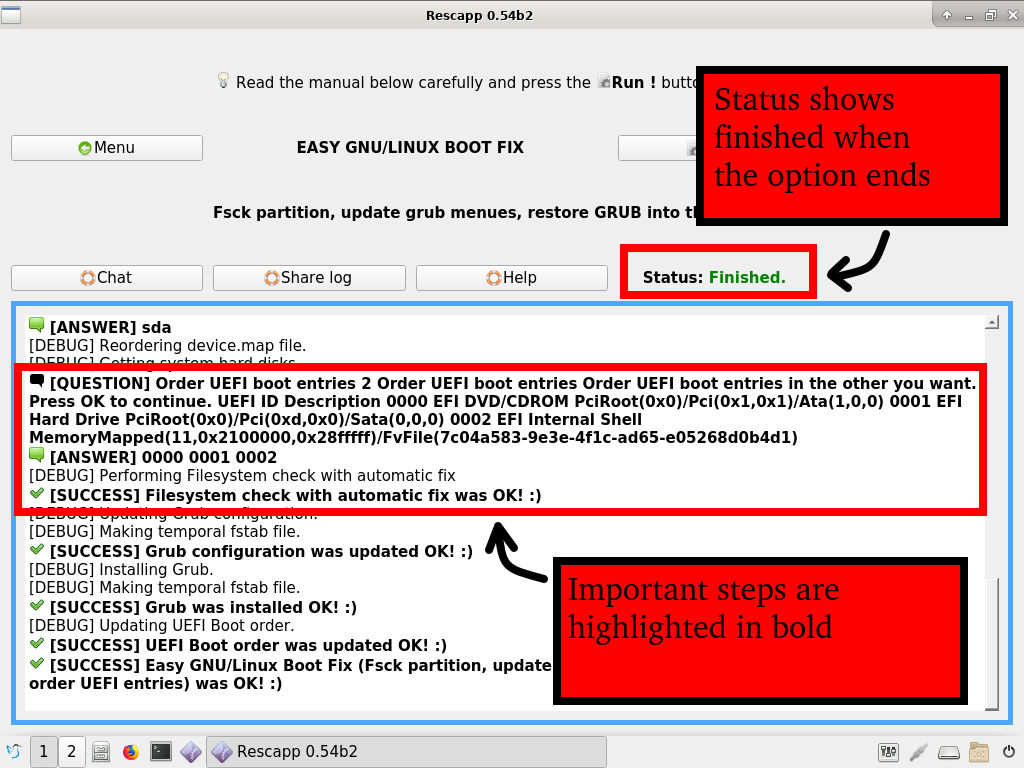
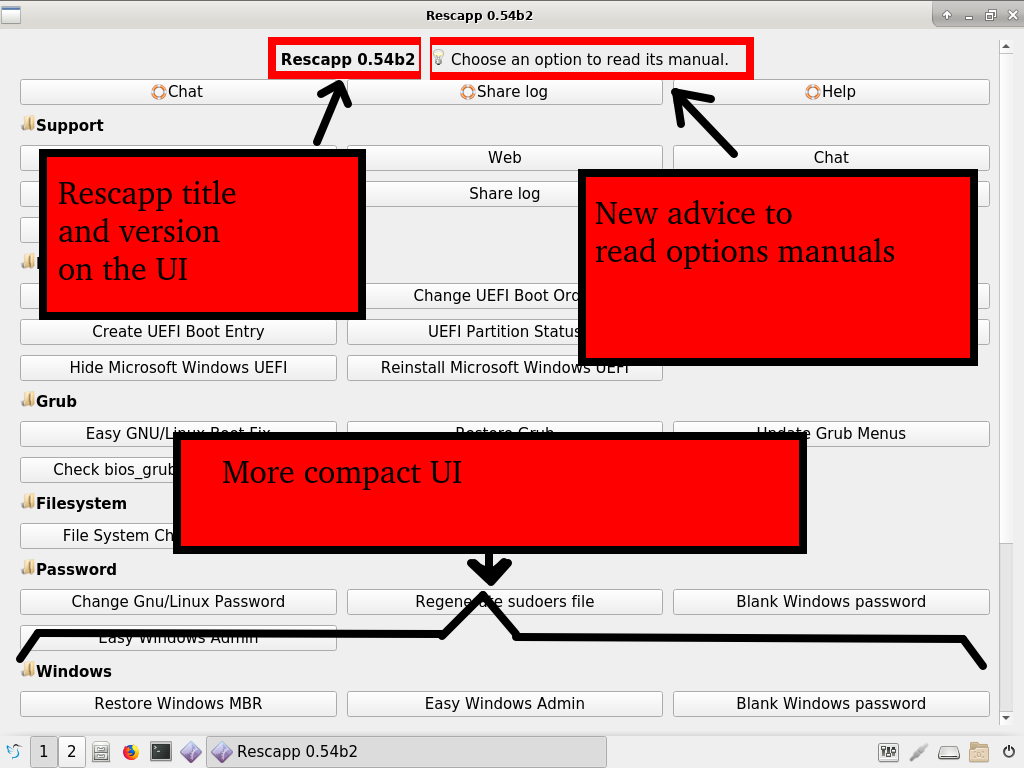
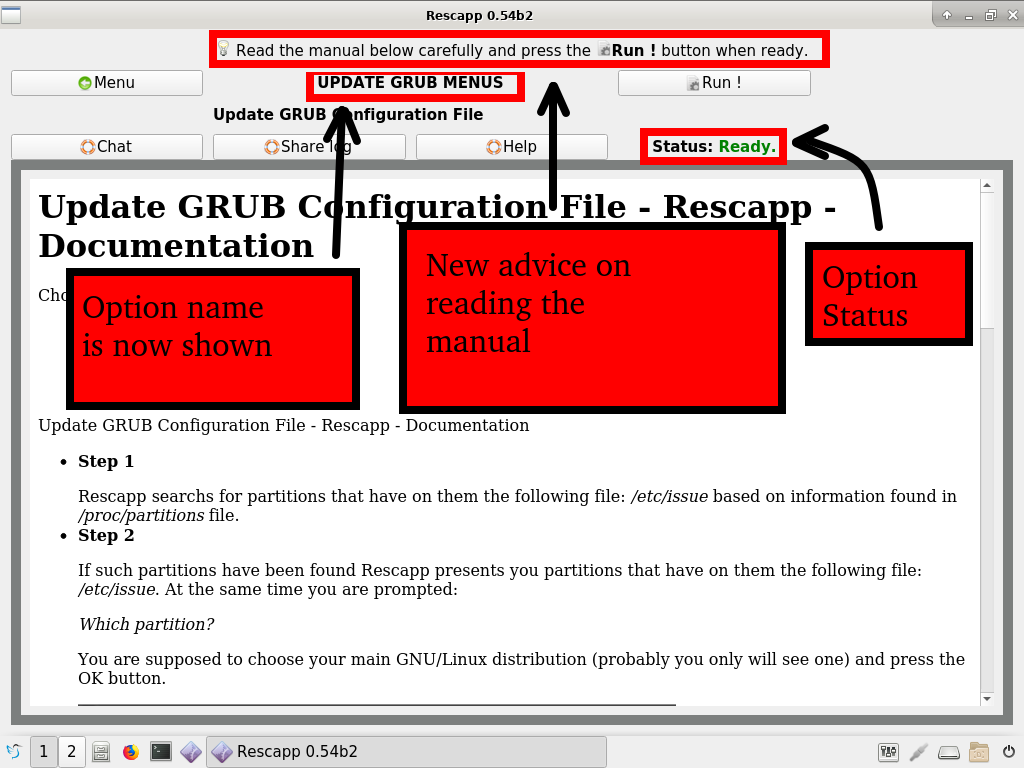
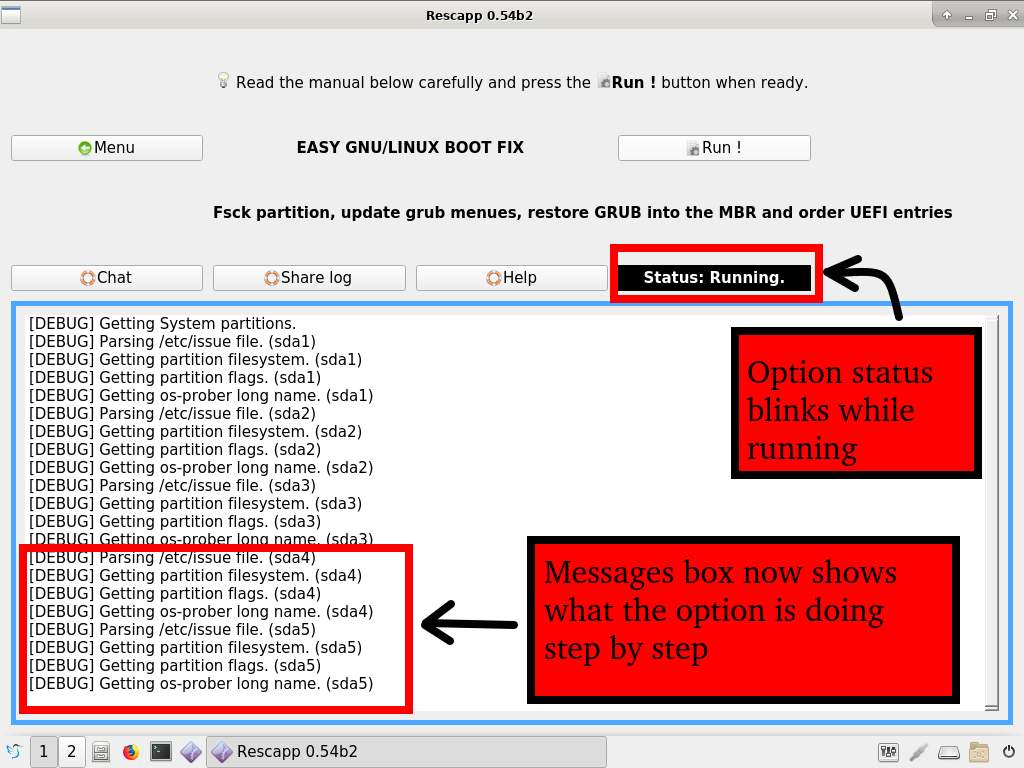
This new version puts Gparted back into the iso and updates to Rescapp 0.54b2 which features two important usability updates: An status label will show if an options is ready to start, running or finished. And a new messages box will show every step the option is performing highlighting the most important ones in bold. No more flickering of fast status messages pop-ups as it happened in earlier versions.
Additionally the user is driven first to click into the options to read their manuals and to read the manuals carefully before clicking the Run! button.
This is another beta version of Rescatux. The last Rescatux beta was released on May 2019. That’s about five months ago.
This new version features two important fixes: Now Grub recovery in tmpfs enabled distributions such as Ubuntu will work again. Some uefi systems with secure boot disabled that happened to crashed Rescapp no longer crash it.
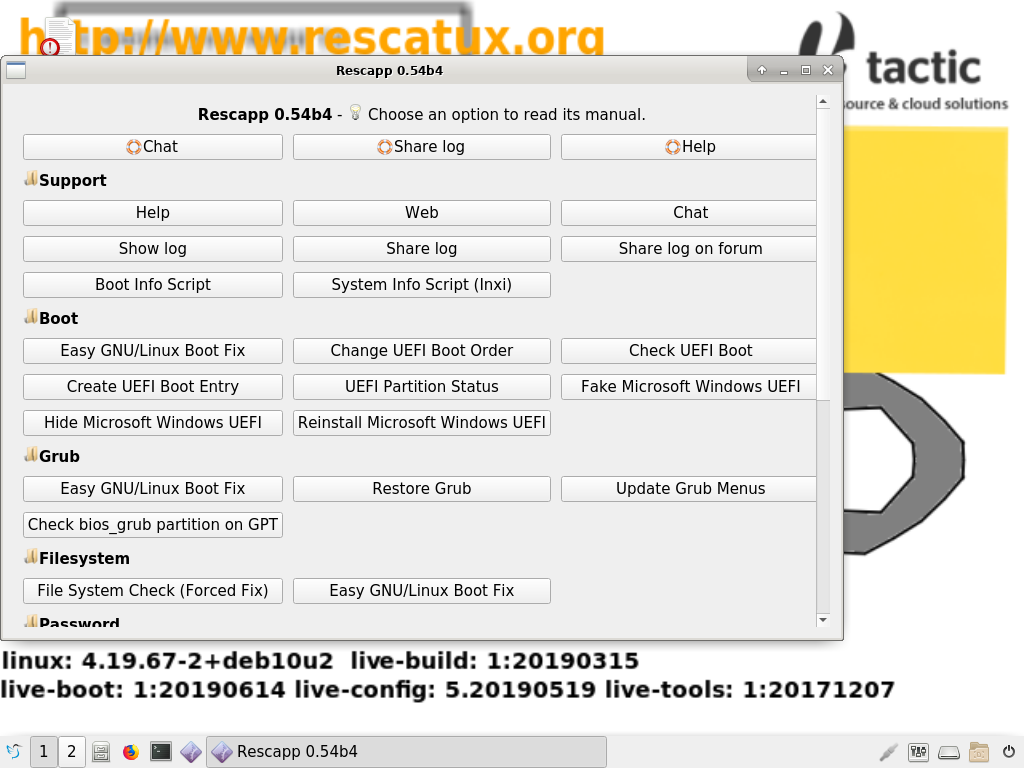
Additionally Rescapp menu has been reworked. Finally Rescatux live cd uefi boot menu and bios boot menu have been reworked.
Added xterm package so that external programs can be opened from within rescapp
Move testdisk package dependency from Rescapp to Rescatux
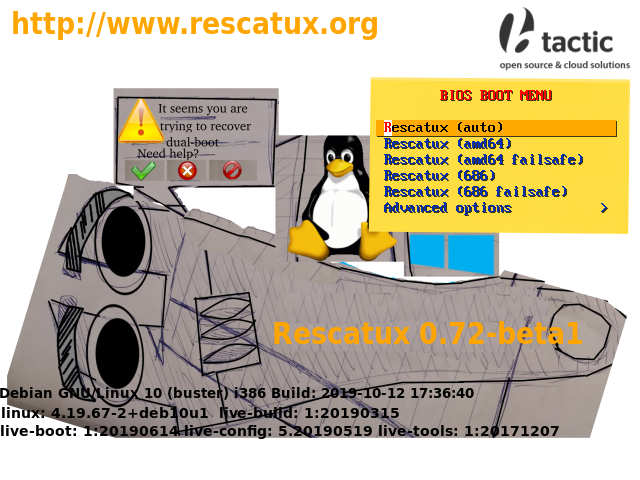
New background and associated boot menues improved
Based on Debian Buster which now it’s officially stable
What’s new on Rescapp
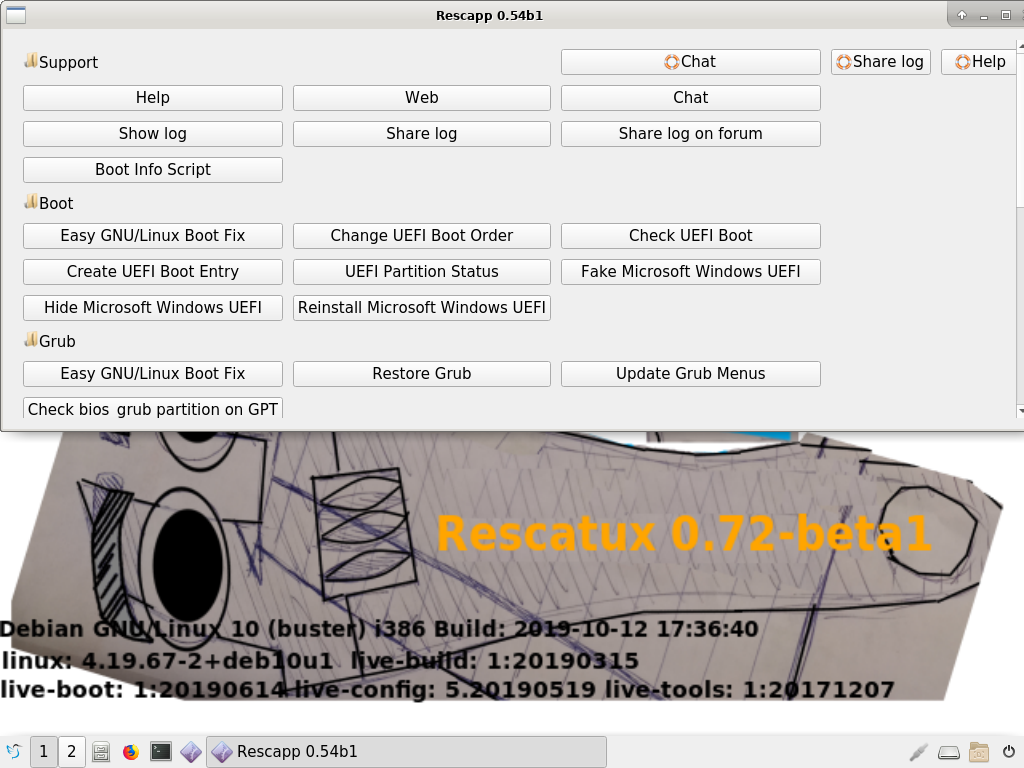
Rescatux 0.72-beta1 featuring Rescapp 0.54b1
Added Xterm self test
There’s no longer a back button. Improved menu.
Fixed: Non secure boot UEFI mode make rescapp to crash before its menu.
Do not mount neither the root partition nor the tmp partition when performing chroot grub operations. That reenables being able to fix Ubuntu grub properly.
Rescapp was ported from python2 to python3
Improved compatibility with Fedora (Big thanks to cjg67)
Removed gddrescue and myrescue dependencies
Move testdisk package dependency from Rescapp to Rescatux
Move gparted package dependency from Rescapp to Rescatux
This last week I have been unable to sleep. Why? My friend adrian15 told me about him releasing another beta version of Rescatux. The last Rescatux beta was released on December 2017. That’s more than a year ago.
He has been hyping me about all those new features that this iso is going to have for the past two months. And he has also bothered me with all the problems he had been finding along the way. He is very persistent because he has finally managed to work around most of them.
So, the first thing I want to point out is that Rescatux, as you might know is usually based on Debian stable. Well, Rescatux 0.51b3 was based on Debian Jessie 8 and Rescatux 0.71 beta is based on Debian Buster 10 which happens not to be a Debian stable because it has not been released yet.
Debian Buster 10 will be release as stable Debian in the next months
But Debian Buster is frozen and it will be released as Debian stable in less than a year.
Using Debian Buster 10 instead of Debian Jessie 8 as a base means that more recent hardware will be supported out of the box. And that’s great because I recently bought a HP250 G6 2SX60EA laptop and I want to test Rescatux on it. So that I can give adrian15 more work Ha Ha Ha !
The other nice about this iso is the many ways it can be booted. Super Grub2 Disk which has an hybrid boot that supports i386-pc, ia32-efi and amd64-efi boots is from the same author. So you should not an expect an amd64 only disk and an i386 only disk but an hybrid one.
And that’s what you get. Here there is a boot options summary table:
Secure Boot
BIOS/EFI platform
Kernel Arch
Boot?
On
x64 EFI
amd64
Yes
On
x64 EFI
i386
Seems not to work
On
ia32 EFI
amd64
Non tested
On
ia32 EFI
i386
Non tested
Secure Boot
BIOS/EFI platform
Kernel Arch
Boot?
Off
x64 EFI
amd64
Yes
Off
x64 EFI
i386
Yes
Off
ia32 EFI
amd64
Non tested
Off
ia32 EFI
i386
Non tested
Secure Boot
BIOS/EFI platform
Kernel Arch
Boot?
Off
BIOS
amd64
Yes
Off
BIOS
i386
Yes
Have you noticed it? Yeah, that’s it. Now Rescatux 0.71 beta 7 gets Secure Boot support from Debian Buster. And it’s Secure Boot which works with Microsoft Secure Boot enabled machines. So we are not going to need to tweak our UEFI firmware to be able to boot Rescatux. Yay!
What more about boot? Yes, there is this liveid thing that adrian15 made up so that some hp laptops that come with live-build installations do not confuse Rescatux boot. That’s supposed to be a new standard for live cds but according to what he has told me not many distros are willing to adopt it.
It’s UUID for live cds he has told me. It should be make easier the work of Yumi, Rufus, Easy2Boot and similar tools if combined with loopback.cfg according to him. Go figure.
Hands on – Boot
Enough talking.
Let’s boot the iso and see what we get at.
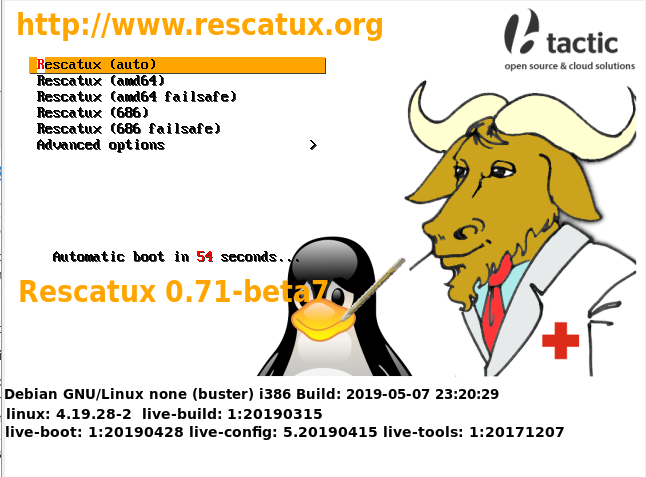
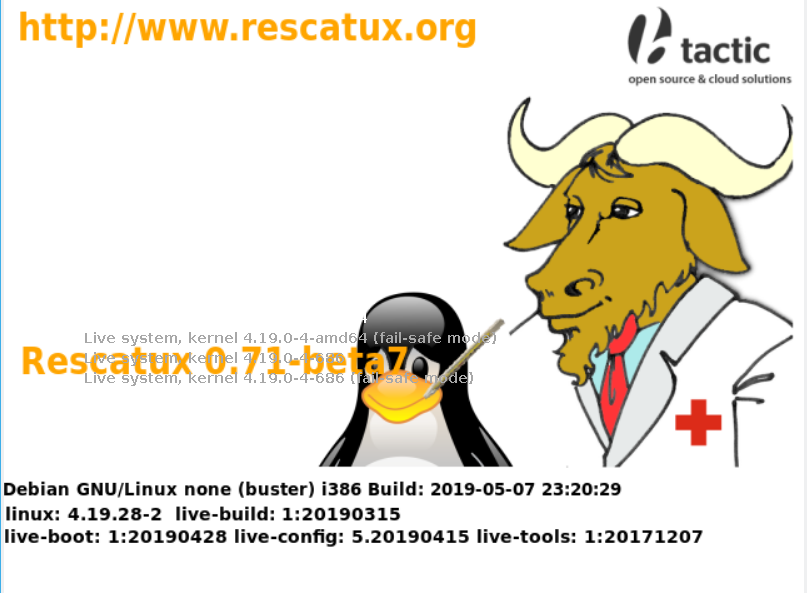
I’m getting an isolinux menu with a countdown when booted in BIOS mode. Look at that! The poor tux penguin has beta 7 all of over his face! XD XD XD . This needs to be fixed in the next stable release. #FreeTuxFromBeta7
Rescatux BIOS boot menu #FreeTuxFromBeta7
However when I boot in UEFI mode I am not getting a countdown and the default boot entry cannot be seen because it’s white and the background is also white. I remember seeing this same problem in Rescatux 0.51b3. This has not been definitively been fixed.
Rescatux UEFI boot menu
Rescatux Desktop
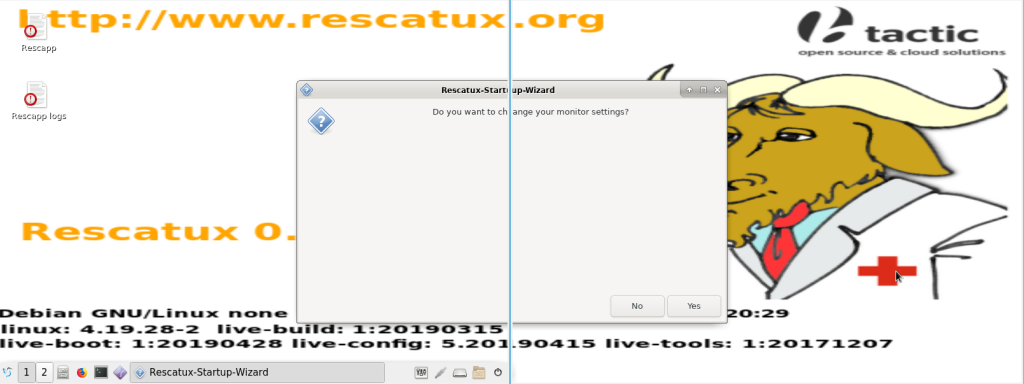
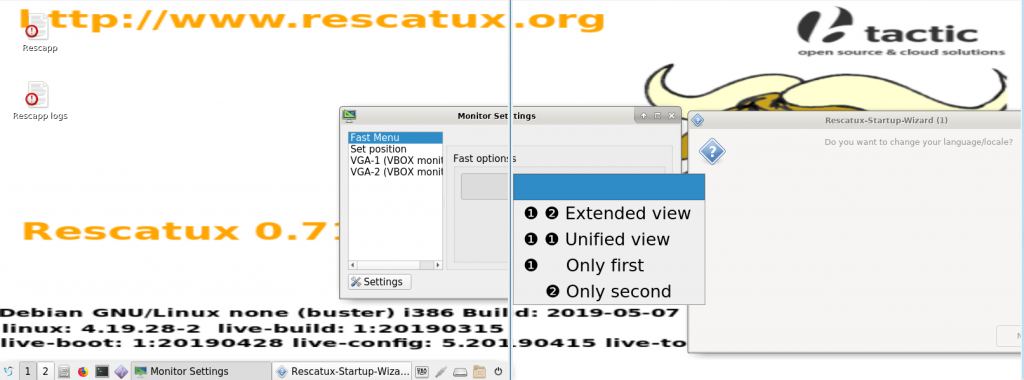
What about having a laptop with a semi broken screen? I had to install open-vm-tools-desktop package on my virtualbox instance but I finally managed to make it work with two screens. That way I can show it to you without using a blurry mobile phone photo 😉 .
Guess what?
Rescatux gets you covered because you can start the monitor settings when monitors are horizontally stretched. The dialogs concerning monitor settings are centered among the two monitors.
So that means that I can finally recover my old broken screen laptop. I just disable my laptop screen and leave enabled the external screen. And there’s no need for me to learn hotkeys and commands to run those screen setup screens manually.
Rescatux Startup Wizard centered between two screensChange Monitor Settings centered between two screens
By the way this monitor settings dialog is a part of the new Rescatux startup wizard.
Rescapp was already a wizard for your rescue tasks but adrian15 managed to add this new wizard for the live cd itself. These new Rescatux startup wizard feature are quite neat so that you can customize your Rescatux session.
Change monitor settings
Change language/locale
Change keyboard layout
Turn off VNC Server or change its password
VNC Server. That is an interesting feature for youtubers and maybe cloud users.
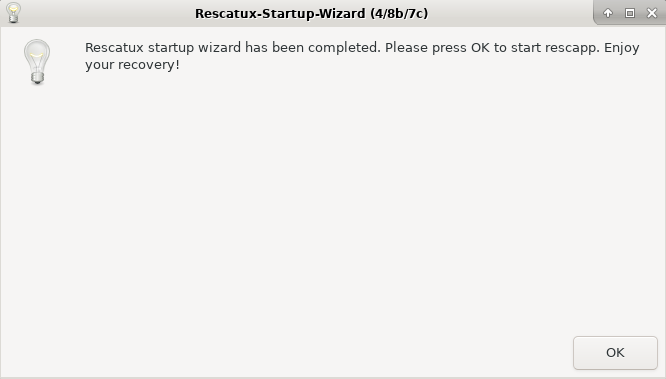
Now Rescatux starts up a VNC server at startup so that you can access it from the network. I have asked adrian15 on how to setup an static ip from boot parametres as I had seen in the past in GRML but he has told me it is not implemented yet. ‘You have to rely on dhcp or setup the static ip manually.’ he has told me. Look at this, we are ready to run Rescapp. Finally! This was getting bored because Rescapp is what matters in this distro.
Is this Rescapp?
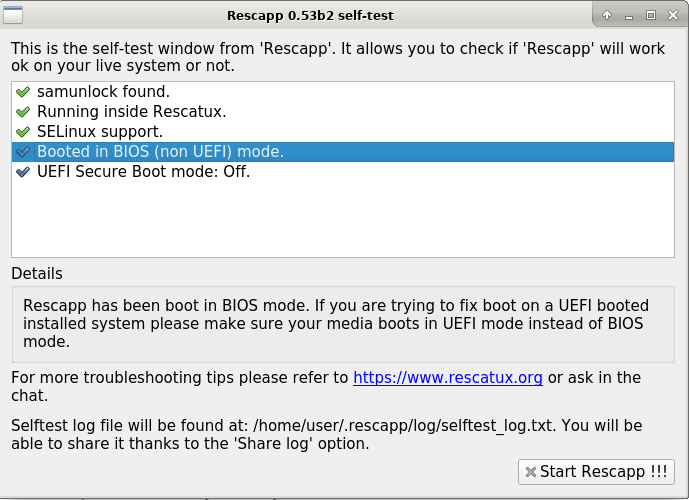
What do we have here? This is Rescapp. But this is not the Rescapp that I know of with all those options. Let’s read the windows title:
Rescapp Self-Test
Rescapp checks itself thanks to self-test new functionality
I first thought this screen was meant for people to know if they had boot in Secure Boot or in UEFI mode. That’s useful because when playing with UEFI and BIOS boot I have learnt that every OS in the computer needs to be either boot in UEFI mode or in BIOS mode. Not the two of them mixed.
Later on, while discussing with adrian15 about this option he has told me about him converting rescapp and chntpw (what makes possible to reset Microsoft Windows passwords) into proper Debian packages. As Rescapp is available as an upstream package or as a Debian package it might appear in other distros without being able to show its full potential.
So now when a distro lacks SELinux support you know. If the distro has not packaged the forked version of chntpw that Rescapp uses then you also know. But you are not forbidden of using Rescapp. Maybe SeLinux support (needed by RHEL, Fedora, Centos,…) is not used by your usual distro so it does not affect you.
So Self-test not only helps you to diagnose if you have boot in the proper mode (UEFI or BIOS) but also if your live cd is lacking some of the Rescapp requirements.
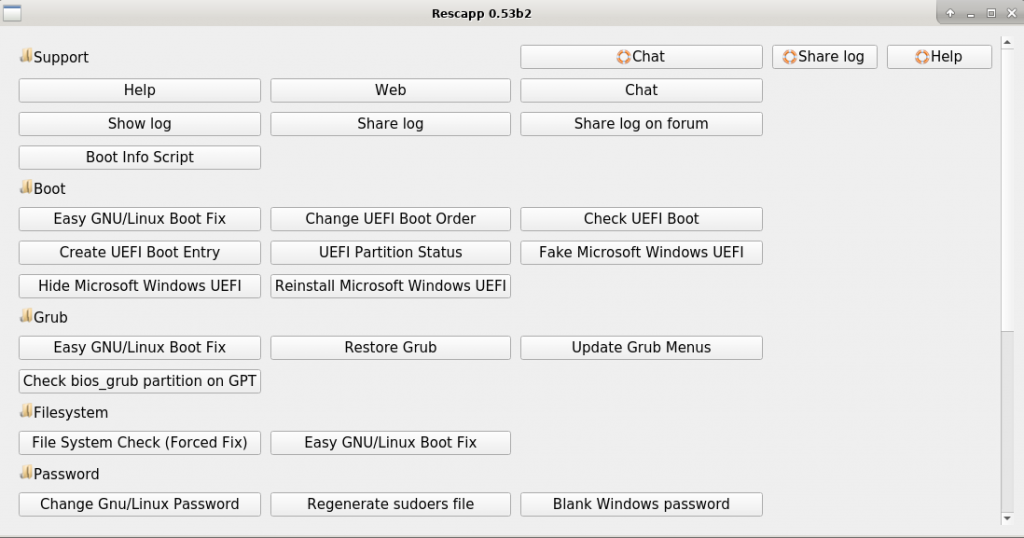
After you click on the Start Rescapp !!! button you finally get out beloved Rescapp.
Our beloved Rescapp UI
Rescapp not so updated and angry call
I took a depth look into Rescapp for about long thirty minutes but I didn’t see anything relevant. This was confusing. I was expecting some Secure Boot options now that Rescatux could boot from Secure Boot machines. I was expecting him to fullfill all of the options embeded html documentation that I had complained to him when he released 0.51b3 version and I had to dig inside his rescapp scripts to understand them.
I had to phone adrian15.
He laughed at me. He was expecting my call. Too much work on putting up Rescatux up to date and adding all of those fancy wizards was his explanation. When I was going to complain to him about the awful design of the beta7 text in front of the now sad penguin he told me: Pull requests are welcome and he hung up the phone on me!
Torrent (Open the link the in browser and click on Download Torrent File Now)
Rescatux 0.51b3 size is about 640 Megabytes.
Some thoughts:
Boot Repair functionality has been removed from Rescatux. Many people, somehow, were using Boot Repair (by default) inside Rescatux while we don’t support it.
If you feel Rescapp does not cover all the Boot Repair functionality you can fill a bug for a RFE (Request for Enhacement).
Rescapp and chntpw are now installed from a Repo. It should be virtually identical to 0.41b1 release. If something doesn’t work as well as before please report a bug so that we can fix it.
This is the last build based on Debian 8 (Jessie).
Important notice:
If you want to use the UEFI options make sure you use DD or another equivalent tool (Rufus in ‘Direct image’ mode, usb imagewriter, etc.) to put Rescatux in your USB
If you want to use UEFI options make sure you boot your Rescatux device in UEFI mode
If you want to use Rescatux make sure you temporarly disable Secure Boot. Rescatux does not support booting in Secure Boot mode but it should be able to fix most of the UEFI Secure Boot problems if booted in Non Secure Boot mode.
More things I want to do before the stable release are:
Make clear that ‘Extra tools’ are not supported renaming them to ‘Extra tools (Non supported)’
Internal documentation updated
A new Rescatux website (Optional)
A new Rescatux tutorial video or videos (Optional)
Let’s hope it happens sooner than later.
Roadmap for Rescatux 0.40 stable release:
You can check the complete changelog with link to each one of the issues at: Rescatux 0.32-freeze roadmap which I’ll be reusing for Rescatux 0.40 stable release.
(Fixed in 0.40b5) [#2192] UEFI boot support
(Fixed in 0.40b2) [#1323] GPT support
(Fixed in 0.40b11) [#1364] Review Copyright notice
(Fixed in: 0.32b2) [#2188] install-mbr : Windows 7 seems not to be fixed with it
(Fixed in: 0.32b2) [#2190] debian-live. Include cpu detection and loopback cfg patches
(Fixed in: 0.40b8) [#2191] Change Keyboard layout
(Fixed in: 0.32b2) [#2193] bootinfoscript: Use it as a package
(Fixed in: 0.32b2) [#2199] Btrfs support
(Closed in 0.40b1) [#2205] Handle different default sh script
(Fixed in 0.40b2) [#2216] Verify separated /usr support
(Fixed in: 0.32b2) [#2217] chown root root on sudoers
[#2220] Make sure all the source code is available
(Fixed in: 0.32b2) [#2221] Detect SAM file algorithm fails with directories which have spaces on them
(Fixed in: 0.32b2) [#2227] Use chntpw 1.0-1 from Jessie
(Fixed in 0.40b1) [#2231] SElinux support on chroot options
(Checked in 0.40b11) [#2233] Disable USB automount
(Fixed in 0.40b9) [#2236] chntpw based options need to be rewritten for reusing code
[#2239]https://www.supergrubdisk.org/wizard-step-put-rescatux-into-a-media/ suppose that the image is based on Super Grub2 Disk version and not Isolinux.The step about extracting iso inside an iso would not be longer needed. Update doc: Put Rescatux into a media for Isolinux based cd
(Fixed in: 0.32b2) [#2259] Update bootinfoscript to the latest GIT version
(Fixed in: 0.40b9) [#2264] chntpw – Save prior registry files
(Fixed in: 0.40b9) [#2234] New option: Easy Grub fix
(Fixed in: 0.40b9) [#2235] New option: Easy Windows Admin
Changes (0.51b3):
boot-repair was removed
rescapp and chntpw fetched from Rescatux repo
New options (0.41b1):
(Added in 0.41b1) Update UEFI order
(Added in 0.41b1) Create a new UEFI Boot entry
(Added in 0.41b1) UEFI Partition Status
(Added in 0.41b1) Fake Microsoft Windows UEFI
(Added in 0.41b1) Hide Microsoft Windows UEFI
(Added in 0.41b1) Reinstall Microsoft Windows EFI
(Added in 0.41b1) Check UEFI Boot
Improved bugs (0.41b1):
(Improved in 0.41b1) Now EFI System partitions are shown properly in the Rescapp menues
(Improved in 0.41b1) Now partition types are shown in partition dialogs in the Rescapp menues
(Improved in 0.41b1) Now partition flags are shown in partition dialogs in the Rescapp menues
(Improved in 0.41b1) Now partition os-prober long names are shown in partition dialogs in the Rescapp menues
(Improved in 0.41b1) Show ‘Unknown GNU/Linux distro’ if we ever fail to parse an /etc/issue file.
(Improved in 0.41b1) Usability improvement. When moving entries the last entry moved keeps selected.
Improved bugs (0.40b11):
(Improved in 0.40b11) Many source code build improvements
(Improved in 0.40b11) Now most options show their progress while running
(Improved in 0.40b11) Added a reference to the source code’s README file in the ‘About Rescapp’ option
(Improved in 0.40b11) Not detected’ string was renamed to ‘Windows / Data / Other’ because that’s what it usually happens with Windows OSes
Fixed bugs (0.40b11):
(Fixed in 0.40b11) [#1364] Review Copyright notice
(Checked in 0.40b11) [#2233] Disable USB automount
(Fixed in 0.40b11) Wineasy had its messages fixed (Promote and Unlock were swapped)
(Fixed in 0.40b11) Share log function now drops usage of cat to avoid utf8 / ascii problems.
(Fixed in 0.40b11) Sanitize ‘Not detected’ and ‘Cannot mount’ messages
Fixed bugs (0.40b9):
(Fixed in 0.40b9) [#2236] chntpw based options need to be rewritten for reusing code
(Fixed in: 0.40b9) [#2264] chntpw – Save prior registry files
(Fixed in: 0.40b9) [#2234] New option: Easy Grub fix
(Fixed in: 0.40b9) [#2235] New option: Easy Windows Admin
Fixed bugs (0.40b8):
(Fixed in 0.40b8) [#2191] Change Keyboard layout
Improved bugs (0.40b7):
(Improved in 0.40b7) [#2192] UEFI boot support (Yes, again)
Improved bugs (0.40b6):
(Improved in 0.40b6) [#2192] UEFI boot support
Fixed bugs (0.40b5):
(Fixed in 0.40b5) [#2192] UEFI boot support
Fixed bugs (0.40b2):
(Fixed in 0.40b2) [#1323] GPT support
(Fixed in 0.40b2) [#2216] Verify separated /usr support
Fixed bugs (0.40b1):
(Fixed in 0.40b1) [#2231] SElinux support on chroot options
Reopened bugs (0.40b1):
(Reopened in 0.40b1) [#2191] Change Keyboard layout
Fixed bugs (0.32b3):
(Fixed in 0.32b3) [#2191] Change Keyboard layout
Other fixed bugs (0.32b2):
Rescatux logo is not shown at boot
Boot entries are named “Live xxxx” instead of “Rescatux xxxx”
Fixed bugs (0.32b1):
Networking detection improved (fallback to network-manager-gnome)
Bottom bar does not have a shorcut to a file manager as it’s a common practice in modern desktops. Fixed when falling back to LXDE.
Double-clicking on directories on desktop opens Iceweasel (Firefox fork) instead of a file manager. Fixed when falling back to LXDE.
Improvements (0.32b1):
Super Grub2 Disk is no longer included. That makes easier to put the ISO to USB devices thanks to standard multiboot tools which support Debian Live cds.
Rescapp UI has been redesigned
Every option is at hand at the first screen.
Rescapp options can be scrolled. That makes it easier to add new options without bothering on final design.
Run option screen buttons have been rearranged to make it easier to read.
RazorQT has been replaced by LXDE which seems more mature. LXQT will have to wait.
WICD has been replaced by network-manager-gnome. That makes easier to connect to wired and wireless networks.
It is no longer based on Debian Unstable (sid) branch.
Torrent (Open the link the in browser and click on Download Torrent File Now)
Rescatux 0.41b1 size is about 672 Megabytes.
Some thoughts:
I couldn’t have released an stable Rescatux without UEFI options so I had to add them. So here there are. Please test them and give us feedback either on the mailing list or in the bugs. Depending on how these new options replace Boot Repair functionality I will remove it from Rescatux. Many people, somehow, are using Boot Repair inside Rescatux while we don’t support it and that should be fixed in the next Rescatux stable release.
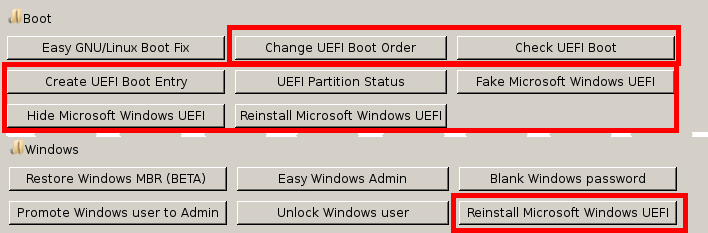
This new beta release comes with new exciting UEFI options:
Update UEFI order
Create a new UEFI Boot entry
UEFI Partition Status
Fake Microsoft Windows UEFI
Hide Microsoft Windows UEFI
Reinstall Microsoft Windows EFI
Check UEFI Boot
You can take a look at the new UEFI options on Rescatux – New UEFI options explained video (The video is a live session, it was not scripted in advance, and that means that it might be longer than needed and maybe boring. You have been warned 😉 . )
The Youtube description has the specific links for each one of the options.
I will explain these in detail here. This will probably go into the features page in the future.
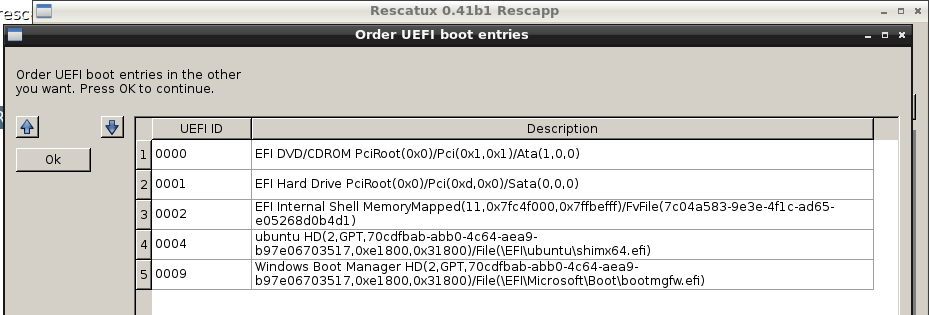
* New option: Update UEFI order option
** Show all available UEFI boot entries and lets you order them

* New option: Create a new UEFI Boot entry.
** Select an EFI file among those present in the ESP partition and add them to the UEFI boot
** Make it the default boot entry

* New option: UEFI Partition Status to know if an ESP partition is a proper ESP partition or not
** Checks if fdisk detects it as an esp partition
** Checks esp flag on the partition
** Checks boot flag on the partition
** Checks if there's a valid filesystem (fat12,fat16 or fat32) on the partition
** Checks if the partition can be mounted
** Checks if the partition' hard disk type is either gpt or msdos

* New option:  Fake Microsoft Windows UEFI boot entry
** Select an EFI file and overwrite the Microsoft EFI files
** Rename it to 'Windows Boot Manager' too.

* New option: Hide Microsoft Windows UEFI boot entry and define default fallback one.
** Select an EFI file and overwrite the default EFI one
** Make sure to delete the default Microsoft Windows ones
** This should be useful for fault UEFIs as the HP EliteBook 8460p or HP EliteBook 8460p laptops

* New option: Reinstall Microsoft Windows EFI
** It copies UEFI files from Windows installation into EFI System Partiton (ESP)
** It adds a new 'Windows Boot Manager' entry and makes it the default one.
** Unfortunately this option is unable to regenerate BCD so it's only useful when you only overwrite or lose the UEFI files
There haven been also many usability improvements to make the life of the final user easier:
* Now EFI System partitions are shown properly in the Rescapp menues
* Now partition types are shown in partition dialogs in the Rescapp menues
* Now partition flags are shown in partition dialogs in the Rescapp menues
* Now partition os-prober long names are shown in partition dialogs in the Rescapp menues
* Show 'Unknown GNU/Linux distro' if we ever fail to parse an /etc/issue file.
* order.py: Usability improvement. When moving entries the last entry moved keeps selected.

* Rescatux width has been increased to 800 pixels.
* Added AFD scanning tecnology adapted for Spanish systems.
* Many grubeasy option improvements (Now handles UEFI too)
Important notice:
If you want to use the UEFI options make sure you use DD or another equivalent tool (Rufus in ‘Direct image’ mode, usb imagewriter, etc.) to put Rescatux in your USB
If you want to use UEFI options make sure you boot your Rescatux device in UEFI mode
If you want to use Rescatux make sure you temporarly disable Secure Boot. Rescatux does not support booting in Secure Boot mode but it should be able to fix most of the UEFI Secure Boot problems if booted in Non Secure Boot mode.
More things I want to do before the stable release are:
Make clear that ‘Extra tools’ are not supported renaming them to ‘Extra tools (Non supported)’
Internal documentation updated
A new Rescatux website (Optional)
A new Rescatux tutorial video or videos (Optional)
Let’s hope it happens sooner than later.
Roadmap for Rescatux 0.40 stable release:
You can check the complete changelog with link to each one of the issues at: Rescatux 0.32-freeze roadmap which I’ll be reusing for Rescatux 0.40 stable release.
(Fixed in 0.40b5) [#2192] UEFI boot support
(Fixed in 0.40b2) [#1323] GPT support
(Fixed in 0.40b11) [#1364] Review Copyright notice
(Fixed in: 0.32b2) [#2188] install-mbr : Windows 7 seems not to be fixed with it
(Fixed in: 0.32b2) [#2190] debian-live. Include cpu detection and loopback cfg patches
(Fixed in: 0.40b8) [#2191] Change Keyboard layout
(Fixed in: 0.32b2) [#2193] bootinfoscript: Use it as a package
(Fixed in: 0.32b2) [#2199] Btrfs support
(Closed in 0.40b1) [#2205] Handle different default sh script
(Fixed in 0.40b2) [#2216] Verify separated /usr support
(Fixed in: 0.32b2) [#2217] chown root root on sudoers
[#2220] Make sure all the source code is available
(Fixed in: 0.32b2) [#2221] Detect SAM file algorithm fails with directories which have spaces on them
(Fixed in: 0.32b2) [#2227] Use chntpw 1.0-1 from Jessie
(Fixed in 0.40b1) [#2231] SElinux support on chroot options
(Checked in 0.40b11) [#2233] Disable USB automount
(Fixed in 0.40b9) [#2236] chntpw based options need to be rewritten for reusing code
[#2239]https://www.supergrubdisk.org/wizard-step-put-rescatux-into-a-media/ suppose that the image is based on Super Grub2 Disk version and not Isolinux.The step about extracting iso inside an iso would not be longer needed. Update doc: Put Rescatux into a media for Isolinux based cd
(Fixed in: 0.32b2) [#2259] Update bootinfoscript to the latest GIT version
(Fixed in: 0.40b9) [#2264] chntpw – Save prior registry files
(Fixed in: 0.40b9) [#2234] New option: Easy Grub fix
(Fixed in: 0.40b9) [#2235] New option: Easy Windows Admin
New options (0.41b1):
(Added in 0.41b1) Update UEFI order
(Added in 0.41b1) Create a new UEFI Boot entry
(Added in 0.41b1) UEFI Partition Status
(Added in 0.41b1) Fake Microsoft Windows UEFI
(Added in 0.41b1) Hide Microsoft Windows UEFI
(Added in 0.41b1) Reinstall Microsoft Windows EFI
(Added in 0.41b1) Check UEFI Boot
Improved bugs (0.41b1):
(Improved in 0.41b1) Now EFI System partitions are shown properly in the Rescapp menues
(Improved in 0.41b1) Now partition types are shown in partition dialogs in the Rescapp menues
(Improved in 0.41b1) Now partition flags are shown in partition dialogs in the Rescapp menues
(Improved in 0.41b1) Now partition os-prober long names are shown in partition dialogs in the Rescapp menues
(Improved in 0.41b1) Show ‘Unknown GNU/Linux distro’ if we ever fail to parse an /etc/issue file.
(Improved in 0.41b1) Usability improvement. When moving entries the last entry moved keeps selected.
Improved bugs (0.40b11):
(Improved in 0.40b11) Many source code build improvements
(Improved in 0.40b11) Now most options show their progress while running
(Improved in 0.40b11) Added a reference to the source code’s README file in the ‘About Rescapp’ option
(Improved in 0.40b11) Not detected’ string was renamed to ‘Windows / Data / Other’ because that’s what it usually happens with Windows OSes
Fixed bugs (0.40b11):
(Fixed in 0.40b11) [#1364] Review Copyright notice
(Checked in 0.40b11) [#2233] Disable USB automount
(Fixed in 0.40b11) Wineasy had its messages fixed (Promote and Unlock were swapped)
(Fixed in 0.40b11) Share log function now drops usage of cat to avoid utf8 / ascii problems.
(Fixed in 0.40b11) Sanitize ‘Not detected’ and ‘Cannot mount’ messages
Fixed bugs (0.40b9):
(Fixed in 0.40b9) [#2236] chntpw based options need to be rewritten for reusing code
(Fixed in: 0.40b9) [#2264] chntpw – Save prior registry files
(Fixed in: 0.40b9) [#2234] New option: Easy Grub fix
(Fixed in: 0.40b9) [#2235] New option: Easy Windows Admin
Fixed bugs (0.40b8):
(Fixed in 0.40b8) [#2191] Change Keyboard layout
Improved bugs (0.40b7):
(Improved in 0.40b7) [#2192] UEFI boot support (Yes, again)
Improved bugs (0.40b6):
(Improved in 0.40b6) [#2192] UEFI boot support
Fixed bugs (0.40b5):
(Fixed in 0.40b5) [#2192] UEFI boot support
Fixed bugs (0.40b2):
(Fixed in 0.40b2) [#1323] GPT support
(Fixed in 0.40b2) [#2216] Verify separated /usr support
Fixed bugs (0.40b1):
(Fixed in 0.40b1) [#2231] SElinux support on chroot options
Reopened bugs (0.40b1):
(Reopened in 0.40b1) [#2191] Change Keyboard layout
Fixed bugs (0.32b3):
(Fixed in 0.32b3) [#2191] Change Keyboard layout
Other fixed bugs (0.32b2):
Rescatux logo is not shown at boot
Boot entries are named “Live xxxx” instead of “Rescatux xxxx”
Fixed bugs (0.32b1):
Networking detection improved (fallback to network-manager-gnome)
Bottom bar does not have a shorcut to a file manager as it’s a common practice in modern desktops. Fixed when falling back to LXDE.
Double-clicking on directories on desktop opens Iceweasel (Firefox fork) instead of a file manager. Fixed when falling back to LXDE.
Improvements (0.32b1):
Super Grub2 Disk is no longer included. That makes easier to put the ISO to USB devices thanks to standard multiboot tools which support Debian Live cds.
Rescapp UI has been redesigned
Every option is at hand at the first screen.
Rescapp options can be scrolled. That makes it easier to add new options without bothering on final design.
Run option screen buttons have been rearranged to make it easier to read.
RazorQT has been replaced by LXDE which seems more mature. LXQT will have to wait.
WICD has been replaced by network-manager-gnome. That makes easier to connect to wired and wireless networks.
It is no longer based on Debian Unstable (sid) branch.
This release comes with one of the most exciting improvements in many years: Most of the options show its subtasks progress while working. That means that the final user will not doubt about Rescatux being frozen or not while he sees an apparently frozen screen.
Another big improvement towards usability is renaming the older ‘Not detected’ partitions to: ‘Windows / Data / Other’ so that people don’t get confused. Many people think their windows is not being detected while there is a windows there.
I guess the partition selection entries could be improved in the future so that they show the actual Windows name (Thanks to os-prober algorithms) and also the filesystem type.
Many other smalls bug fixes have been done. You can check the git log for more details.
I have decided not to release stable release till I add one or two UEFI related options. The one about ordering UEFI boot entries would be there for sure. The current roadmap had been planned for 2012 so it needs some update. It’s true that current Rescatux supports booting from an UEFI system and that if you had already installed grub-efi it reinstalls it in its UEFI partition. But it’s also true that one or two more UEFI options are needed so that magazines stop advising to use Boot Repair inside Rescatux.
More things I want to do before the stable release are:
Make clear that ‘Extra tools’ are not supported renaming them to ‘Extra tools (Non supported)’
Internal documentation updated
A new Rescatux website (Optional)
A new Rescatux tutorial video or videos (Optional)
Add more AFD functionality
Let’s hope it happens sooner than later.
UEFI feedback is still welcome. Specially if the Debian installation disks work for you but not the Rescatux ones.
Roadmap for Rescatux 0.40 stable release:
You can check the complete changelog with link to each one of the issues at: Rescatux 0.32-freeze roadmap which I’ll be reusing for Rescatux 0.40 stable release.
(Fixed in 0.40b5) [#2192] UEFI boot support
(Fixed in 0.40b2) [#1323] GPT support
(Fixed in 0.40b11) [#1364] Review Copyright notice
(Fixed in: 0.32b2) [#2188] install-mbr : Windows 7 seems not to be fixed with it
(Fixed in: 0.32b2) [#2190] debian-live. Include cpu detection and loopback cfg patches
(Fixed in: 0.40b8) [#2191] Change Keyboard layout
(Fixed in: 0.32b2) [#2193] bootinfoscript: Use it as a package
(Fixed in: 0.32b2) [#2199] Btrfs support
(Closed in 0.40b1) [#2205] Handle different default sh script
(Fixed in 0.40b2) [#2216] Verify separated /usr support
(Fixed in: 0.32b2) [#2217] chown root root on sudoers
[#2220] Make sure all the source code is available
(Fixed in: 0.32b2) [#2221] Detect SAM file algorithm fails with directories which have spaces on them
(Fixed in: 0.32b2) [#2227] Use chntpw 1.0-1 from Jessie
(Fixed in 0.40b1) [#2231] SElinux support on chroot options
(Checked in 0.40b11) [#2233] Disable USB automount
(Fixed in 0.40b9) [#2236] chntpw based options need to be rewritten for reusing code
[#2239]https://www.supergrubdisk.org/wizard-step-put-rescatux-into-a-media/ suppose that the image is based on Super Grub2 Disk version and not Isolinux.The step about extracting iso inside an iso would not be longer needed. Update doc: Put Rescatux into a media for Isolinux based cd
(Fixed in: 0.32b2) [#2259] Update bootinfoscript to the latest GIT version
(Fixed in: 0.40b9) [#2264] chntpw – Save prior registry files
(Fixed in: 0.40b9) [#2234] New option: Easy Grub fix
(Fixed in: 0.40b9) [#2235] New option: Easy Windows Admin
Improved bugs (0.40b11):
(Improved in 0.40b11) Many source code build improvements
(Improved in 0.40b11) Now most options show their progress while running
(Improved in 0.40b11) Added a reference to the source code’s README file in the ‘About Rescapp’ option
(Improved in 0.40b11) Not detected’ string was renamed to ‘Windows / Data / Other’ because that’s what it usually happens with Windows OSes
Fixed bugs (0.40b11):
(Fixed in 0.40b11) [#1364] Review Copyright notice
(Checked in 0.40b11) [#2233] Disable USB automount
(Fixed in 0.40b11) Wineasy had its messages fixed (Promote and Unlock were swapped)
(Fixed in 0.40b11) Share log function now drops usage of cat to avoid utf8 / ascii problems.
(Fixed in 0.40b11) Sanitize ‘Not detected’ and ‘Cannot mount’ messages
Fixed bugs (0.40b9):
(Fixed in 0.40b9) [#2236] chntpw based options need to be rewritten for reusing code
(Fixed in: 0.40b9) [#2264] chntpw – Save prior registry files
(Fixed in: 0.40b9) [#2234] New option: Easy Grub fix
(Fixed in: 0.40b9) [#2235] New option: Easy Windows Admin
Fixed bugs (0.40b8):
(Fixed in 0.40b8) [#2191] Change Keyboard layout
Improved bugs (0.40b7):
(Improved in 0.40b7) [#2192] UEFI boot support (Yes, again)
Improved bugs (0.40b6):
(Improved in 0.40b6) [#2192] UEFI boot support
Fixed bugs (0.40b5):
(Fixed in 0.40b5) [#2192] UEFI boot support
Fixed bugs (0.40b2):
(Fixed in 0.40b2) [#1323] GPT support
(Fixed in 0.40b2) [#2216] Verify separated /usr support
Fixed bugs (0.40b1):
(Fixed in 0.40b1) [#2231] SElinux support on chroot options
Reopened bugs (0.40b1):
(Reopened in 0.40b1) [#2191] Change Keyboard layout
Fixed bugs (0.32b3):
(Fixed in 0.32b3) [#2191] Change Keyboard layout
Other fixed bugs (0.32b2):
Rescatux logo is not shown at boot
Boot entries are named “Live xxxx” instead of “Rescatux xxxx”
Fixed bugs (0.32b1):
Networking detection improved (fallback to network-manager-gnome)
Bottom bar does not have a shorcut to a file manager as it’s a common practice in modern desktops. Fixed when falling back to LXDE.
Double-clicking on directories on desktop opens Iceweasel (Firefox fork) instead of a file manager. Fixed when falling back to LXDE.
Improvements (0.32b1):
Super Grub2 Disk is no longer included. That makes easier to put the ISO to USB devices thanks to standard multiboot tools which support Debian Live cds.
Rescapp UI has been redesigned
Every option is at hand at the first screen.
Rescapp options can be scrolled. That makes it easier to add new options without bothering on final design.
Run option screen buttons have been rearranged to make it easier to read.
RazorQT has been replaced by LXDE which seems more mature. LXQT will have to wait.
WICD has been replaced by network-manager-gnome. That makes easier to connect to wired and wireless networks.
It is no longer based on Debian Unstable (sid) branch.
We use cookies to ensure that we give you the best experience on our website. If you continue to use this site we will assume that you are happy with it.Ok