NOTE: The hybrid version should work in most any machine you might have. Please download that version.
Non scientific machine names
Description
Oldie x86
These are very old machines that only have 32-bit processors. Their supported architecture for boot is i386.
Oldie 64bit
These are old machines, usually from 2010 year or before. They have 64-bit processors. Their supported architectures for boot are: i386 and x86_64.
UEFI 64bit
These are new machines, usually from 2011 year or after. They have 64-bit processors. Their supported architecture for boot is: x86_64-efi. If you enable CSM (also known as legacy boot) support on them they also support i386 and x86_64.
UEFI 32bit
These are new machines, usually from 2011 year or after. They are very rare. They have either 64-bit processors or 32-bit processors but somehow boot initially in 32-bit mode. Their supported architecture for boot is: i386-efi. I highly doubt you can enable CSM support on these machines.
NOTE: The hybrid version should work in most any machine you might have. Please download that version.
Recommended. Secure boot enabled. Modern UEFI 64-bit and 32-bit systems and also old BIOS systems. Includes additional BOOTISOS partition so that you can carry your loopback.cfg enabled distributions with you.
Secure boot non enabled. Modern UEFI 64-bit and 32-bit systems and also old BIOS systems. Includes additional BOOTISOS partition so that you can carry your loopback.cfg enabled distributions with you.
Every binary and source code inside a torrent file. For offline people.
About other downloads. These other downloads might be built in the future if anyone complains and helps enough on our mailing list: coreboot, ieee1275, standalone coreboot and standalone ieee1275.
Hashes
In order to check the former downloads you can either check the download directory page for this release
or you can check checksums right here:
Super GRUB2 Disk is a live cd that helps you to boot into most any Operating System (OS) even if you cannot boot into it by normal means.
A new beta release
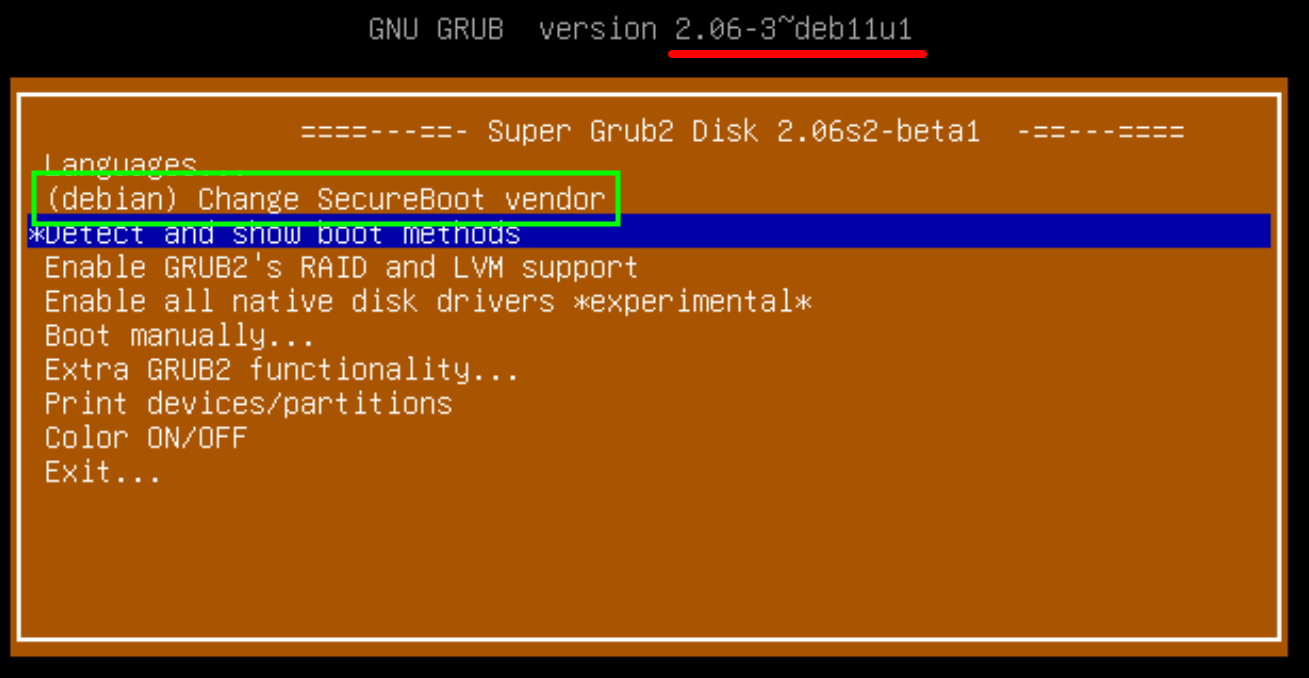
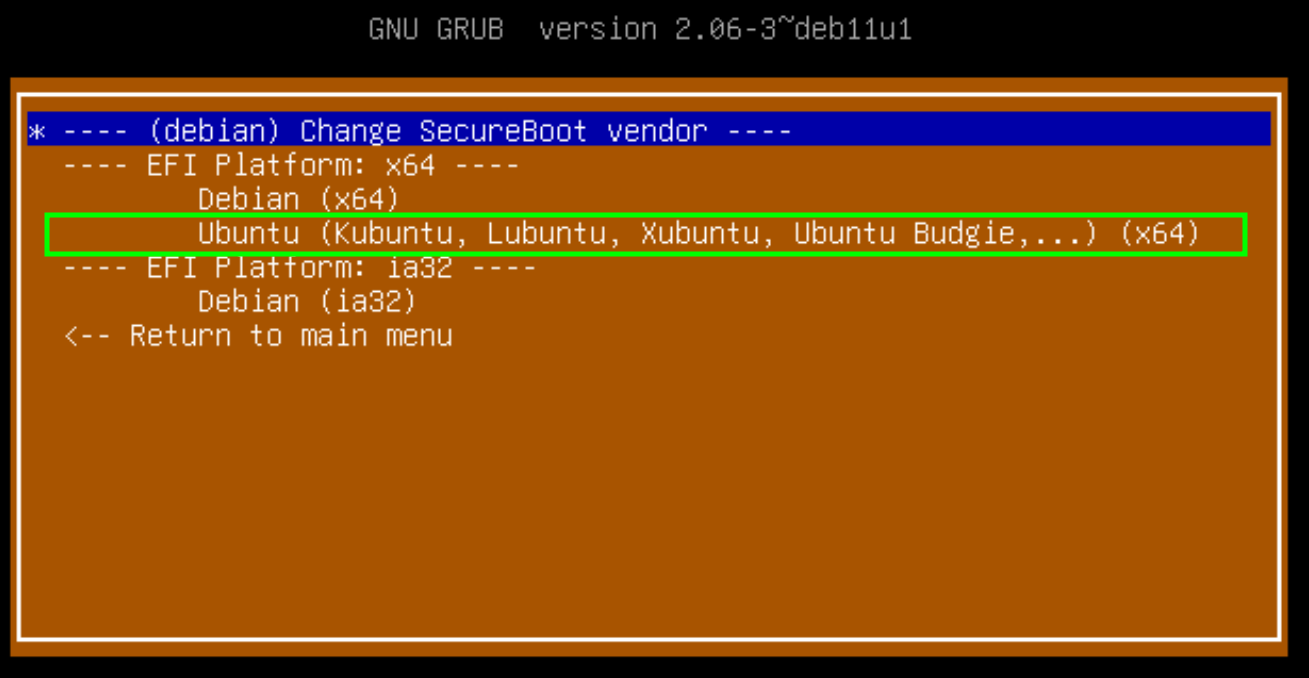
A new beta release which adds SecureBoot support to Super Grub2 Disk. For now Ubuntu (x64) and Debian (ia32 and x64) are only supported, although you can boot into another Distro’s shim (if it’s signed by ‘Microsoft Corporation UEFI CA 2011’) which it’s usually able to boot into its own menu. The specific SecureBoot support aimed at Ubuntu and Debian lets you boot into your Debian or Ubuntu kernels even if there is not shimx64.efi or grub.cfg available in your hard disk. Documentation, specially the developer one, was improved a lot.
I am supposed to add SecureBoot support for more distros so, please, if you have problems booting into Debian or Ubuntu please try this version ( supergrub2-2.06s2-beta1-multiarch-USB.img.zip ) and give us feedback in github issues page so that we can fix it properly. Please specify the exact filename you are using.
Super Grub2 Disk 2.06s2-beta1 – SecureBoot quick Demo
Additional note just in case it’s not clear enough. There has been a renaming of Super Grub2 Disk files. So filenames with ‘classic’ on them means that they do NOT support SecureBoot.
Enjoy the beta and, once again, please give us feedback to report us if it works ok or not for you.
New Change SecureBoot vendor menu from the main menuNew Change SecureBoot vendor menu
Super Grub2 Disk 2.02s5 – Detect and show boot methods in action
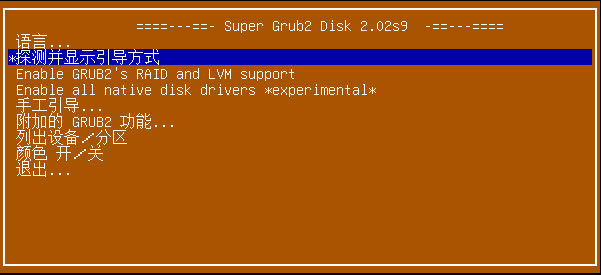
Chinese Super Grub2 Disk main menu
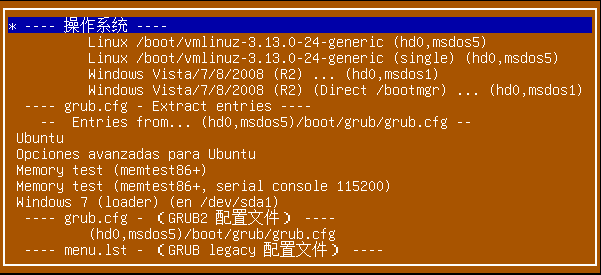
Chinese Super Grub2 Disk – Detect all Operating Systems
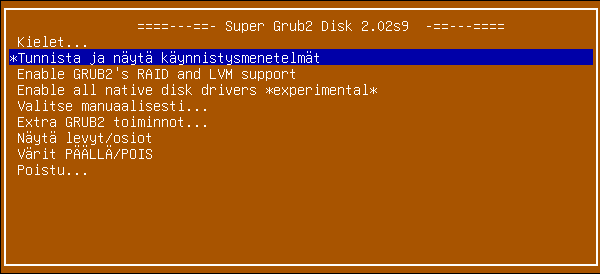
Finnish Super Grub2 Disk main menu
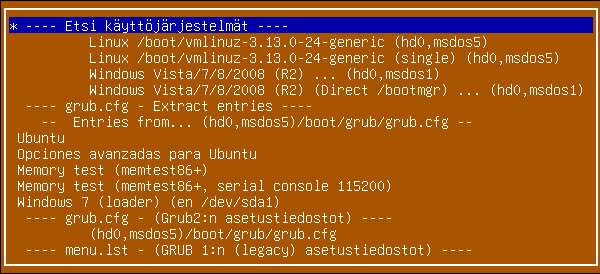
Finnish Super Grub2 Disk – Detect all Operating Systems
We are going to see which are the complete Super Grub2 Disk features with a demo video, where you can download it, the thank you – hall of fame and some thoughts about the Super Grub2 Disk development.
Please do not forget to read our howtos so that you can have step by step guides (how to make a cdrom or an usb, how to boot from it, etc) on how to use Super Grub2 Disk and, if needed, Rescatux.
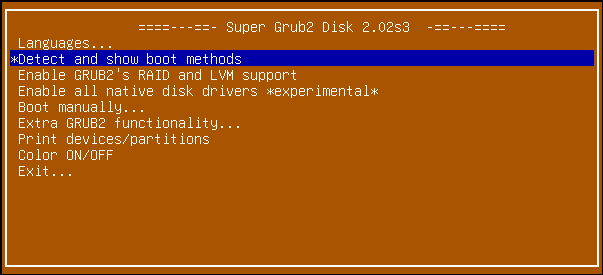
Super Grub2 Disk 2.02s3 main menu
Tour
Here there is a little video tour in order to discover most of Super Grub2 Disk options. The rest of the options you will have to discover them by yourself.
Features
Most of the features here will let you boot into your Operating Systems. The rest of the options will improve the Super Grub2 Disk operating systems autodetecting (enable RAID, LVM, etc.) or will deal with minor aspects of the user interface (Colours, language, etc.).
Change the language UI
Translated into several languages
Spanish / Español
German / Deutsch
French / Français
Italian / Italiano
Malay / Bahasa Melayu
Russian
Finnish / Suomi
Chinese
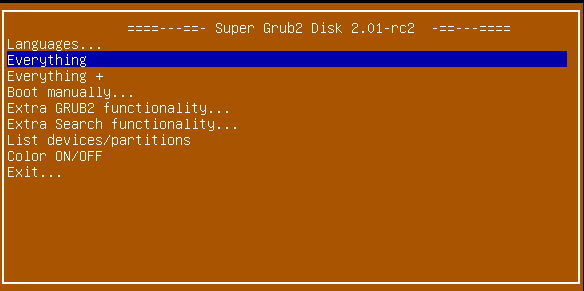
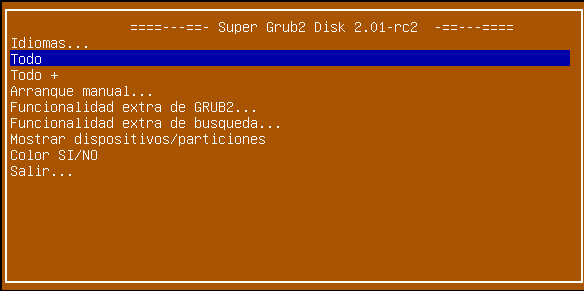
Super Grub2 Disk 2.01 rc2 Spanish Main Menu
Detect and show boot methods option to detect most Operating Systems
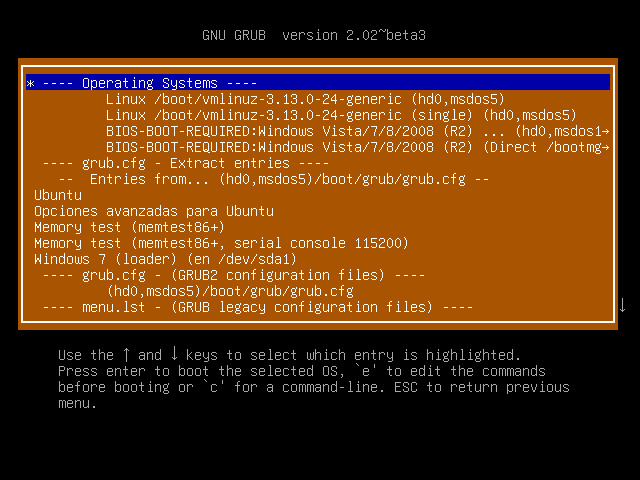
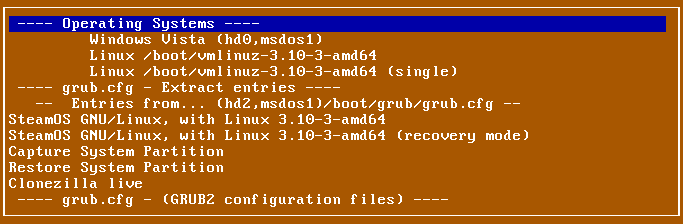
Super Grub2 Disk 2.01 beta 3 – Everything menu making use of grub.cfg extract entries option functionality
Enable all native disk drivers *experimental* to detect most Operating Systems also in special devices or filesystems
Boot manually
Operating Systems
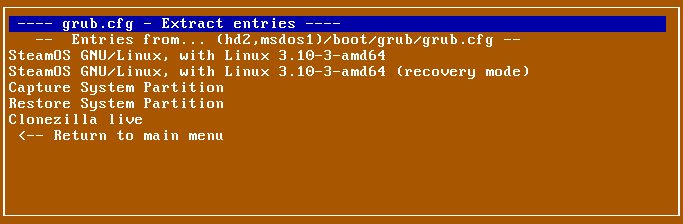
grub.cfg – Extract entries
Super Grub2 Disk 2.01 beta 3 grub.cfg Extract entries option
grub.cfg – (GRUB2 configuration files)
menu.lst – (GRUB legacy configuration files)
core.img – (GRUB2 installation (even if mbr is overwritten))
Disks and Partitions (Chainload)
Bootable ISOs (in /boot-isos or /boot/boot-isos
Extra GRUB2 functionality
Enable GRUB2’s LVM support
Enable GRUB2’s RAID support
Enable GRUB2’s PATA support (to work around BIOS bugs/limitation)
Mount encrypted volumes (LUKS and geli)
Enable serial terminal
Extra Search functionality
Search in floppy ON/OFF
Search in CDROM ON/OFF
List Devices / Partitions
Color ON /OFF
Exit
Halt the computer
Reboot the computer
Supported Operating Systems
Excluding too custom kernels from university students Super Grub2 Disk can autodetect and boot most every Operating System. Some examples are written here so that Google bots can see it and also to make more confident the final user who searchs his own special (according to him) Operating System.
Windows
Windows 10
Windows Vista/7/8/8.1
Windows NT/2000/XP
Windows 98/ME
MS-DOS
FreeDOS
GNU/Linux
Direct Kernel with autodetected initrd
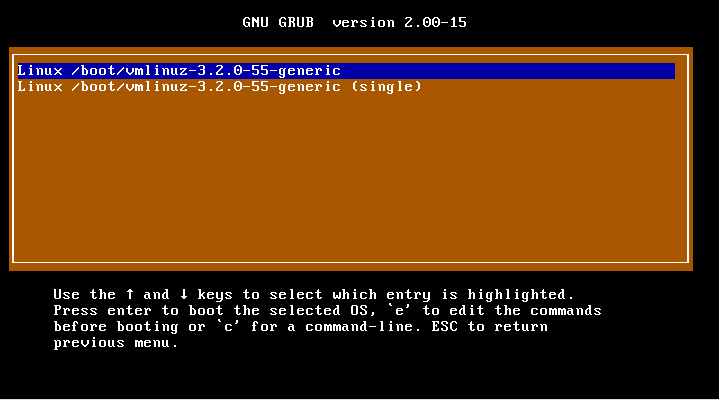
Super Grub2 Disk – Detect any Operating System – Linux kernels detected
vmlinuz-*
linux-*
kernel-genkernel-*
Debian / Ubuntu / Mint
Mageia
Fedora / CentOS / Red Hat Enterprise Linux (RHEL)
openSUSE / SuSE Linux Enterpsise Server (SLES)
Arch
Any many, many, more.
FreeBSD
FreeBSD (single)
FreeBSD (verbose)
FreeBSD (no ACPI)
FreeBSD (safe mode)
FreeBSD (Default boot loader)
EFI files
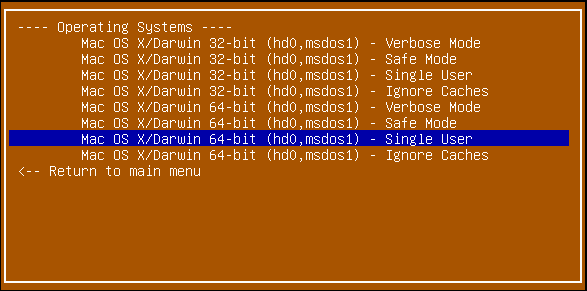
Mac OS X/Darwin 32bit or 64bit
Super Grub2 Disk 2.00s2 rc4 Mac OS X entries (Image credit to: Smx)
Support for different hardware platforms
Before this release we only had the hybrid version aimed at regular pcs. Now with the upcoming new EFI based machines you have the EFI standalone versions among others. What we don’t support is booting when secure boot is enabled.
Most any PC thanks to hybrid version (i386, x86_64, i386-efi, x86_64-efi) (ISO)
EFI x86_64 standalone version (EFI)
EFI i386 standalone version (EFI)
Additional Floppy, CD and USB in one download (ISO)
i386-pc
i386-efi
x86_64-efi
Known bugs
Non English translations are not completed
Supported Media
Compact Disk – Read Only Memory (CD-ROM) / DVD
Universal Serial Bus (USB) devices
Floppy (1.98s1 version only)
Super Grub2 Disk 2.01 rc2 Main Menu
NOTE: The hybrid version should work in most any machine you might have. Please download that version.
Non scientific machine names
Description
Oldie x86
These are very old machines that only have 32-bit processors. Their supported architecture for boot is i386.
Oldie 64bit
These are old machines, usually from 2010 year or before. They have 64-bit processors. Their supported architectures for boot are: i386 and x86_64.
UEFI 64bit
These are new machines, usually from 2011 year or after. They have 64-bit processors. Their supported architecture for boot is: x86_64-efi. If you enable CSM (also known as legacy boot) support on them they also support i386 and x86_64.
UEFI 32bit
These are new machines, usually from 2011 year or after. They are very rare. They have either 64-bit processors or 32-bit processors but somehow boot initially in 32-bit mode. Their supported architecture for boot is: i386-efi. I highly doubt you can enable CSM support on these machines.
NOTE: The hybrid version should work in most any machine you might have. Please download that version.
Recommended. Secure boot enabled. Modern UEFI 64-bit and 32-bit systems and also old BIOS systems. Includes additional BOOTISOS partition so that you can carry your loopback.cfg enabled distributions with you.
Secure boot non enabled. Modern UEFI 64-bit and 32-bit systems and also old BIOS systems. Includes additional BOOTISOS partition so that you can carry your loopback.cfg enabled distributions with you.
Every binary and source code inside a torrent file. For offline people.
About other downloads. These other downloads might be built in the future if anyone complains and helps enough on our mailing list: coreboot, ieee1275, standalone coreboot and standalone ieee1275.
Hashes
In order to check the former downloads you can either check the download directory page for this release
or you can check checksums right here:
SecureBoot: Correct SecureBoot sha256sum filenames so that they are vendor specific too.
SecureBoot: Do not show sha256sum output.
SecureBoot: Make sure to handle wget failure so that sha256sum files are not created.
SecureBoot: download-x64-ubuntu http typo.
SecureBoot: Add long descriptions to the Change SecureBoot vendor menu.
SecureBoot: Make sure that non SecureBoot usb version is now the classic one.
SecureBoot: Add a SecureBoot enabled cdrom too.
SecureBoot: Make sure non SecureBoot images have classic string on them.
SecureBoot: Make that SecureBoot CD is actually SecureBoot.
SecureBoot: Disable SecureBoot CD build for now.
SecureBoot: Make sure to generate SecureBoot sourcecode.
Remove non used line in supergrub-checksums-in-one-file
Make sure big checksum files have the relative path for their files.
INSTALL: Make sure that the automatic build uses all of the needed directories.
DEVELOPMENT, INSTALL reorganisation.
Remove NEWS file which it is no longer used.
Rename documentation files into markdown versions.
README improvements.
README improvements. (2)
Make sure that releases and news-releases directory are in the repo.
Make sure that secureboot-binaries directory is in the repo.
TEST.md was rewritten.
TRANSLATION.md was rewritten.
Some markdown links were fixed.
SGDBUILDER uid and gid can now be changed.
INSTALL.md: Expected released files were added.
DEVELOPMENT.md: Explain how to test Super Grub2 Disk SecureBoot image.
Bump version to 2.06s2-beta1.
Changes since 2.04s2-beta2 version:
Update supergrub-mkcommon functions to be able to build gpt based images.
menulstdetect does not need to use regexp module.
Make sure to use regexp on autoiso. Fixes #46 .
Move ‘GRUB Loopback Config’ from isos to the end. It’s easier to read longer iso names now.
Show when each menu is build with its date. Fixes #44 .
Make sure cfg files do not have execution bit
Disk and partitions: Handle empty label properly.
Merge pull request #49 from mk-pmb/uncontroversial_indentation_fixes
New Docker build system
grub-build-config: Switch to Grub 2.06 version.
April Fools Day prank was removed.
Docker: Use PREVIOUS_VERSION as the environment variable when the docker is run.
Docker: Make sure that devices work seamlessly.
Bump version to 2.06s2-beta1.
mk-pmb (5):
Nicer dates/times for “Detect boot methods”
Marcel’s authorship attribution
Cleanup: Remove trailing whitespaces
Cleanup: Fix mixed tab/space indentations
Cleanup: Normalize indentations to two spaces
Changes since 2.04s1 version:
Add Korean Translation
Use LIVEID in each secureboot vendor cfg
USB hard disk now has an additional partition for ISO files.
supergrub-mkusb: New script for normal (non secure boot) usb creation
New filename standard * ${SUPER_GRUB2_DISK_FILE_PREFIX}-${sgrub_version}-${TARGET_PLATFORM}-${TARGET_DEVICE}.iso * Now we specify not only the media where SG2D is supposed to be put (TARGET_DEVICE) but also the architectures which should be boot on (TARGET_PLATFORM). * Makes all of the filenames consistent * Devices are in capital letters like in Debian disks * Old ‘hybrid’ names are now renamed into ‘CD’ so that usb only users choose the ‘USB’ multiarch one. * Filenames are now separated by “-” and no longer by “_” in order to meet other distros filenaming schemes * super_grub2_disk prefix now it’s just: supergrub2: ** That makes super grub2 disk filenames shorter ** It removes confusion because ‘disk’ might imply a cdrom
Zip USB based images
Changes since 2.02s10 version:
Use grub-2.04 upstream grub2 tag
Changes since 2.02s9 version:
‘Enable all native disk drivers’ option was improved. It no longer crashes.
Now devices are cached and Super Grub2 Disk is faster
Modify sg2d_directory and sg2d_dev_name variables so that SG2D is more portable
Standalone images are no longer broken and show main menu
Changes since 2.02s8 version:
(Devel) supergrub-release-news helps release team to generate a template for its news. Initial implementation.
(Devel) Added supergrub-release-changes to help with the release team.
(Devel) INSTALL: Improved explanation about what release scripts and file outputs.
Rename ‘(GRUB2 installation (even if mbr is overwritten))’ to: ‘(GRUB2 installation)’
Use grub-2.02 upstream grub2 tag (Stable version)
Added Chinese (zh-cn) translation
Added Finnish translation (Thanks to tavallinenvirtanen7)
Changes since 2.02s7 version:
Use grub-2.02-rc2 upstream grub2 tag
Default theme starfield is no longer included. This will make images smaller.
(Devel) Make sure normal isos and standalone images have hash files without its full path.
(Devel) File hashes generation has been rewritten to work from the single supergrub-mkcommon generate_filename_hashes function
(Devel) Now MD5SUMS, SHA1SUMS and SHA256SUMS files are generated as part of the official build.
Changes since 2.02s6 version:
Updated grub 2.02 build to tag: 2.02~rc1
Changes since 2.02s5 version:
Added Russian language
Improved Arch Linux initramfs detection
Added i386-efi build support
Added i386-efi to the hybrid iso
Grub itself is translated when a language is selected
(Devel) Added grub-build-004-make-check so that we ensure the build works
(Devel) Make sure linguas.sh is built when running ‘grub-build-002-clean-and-update’
(Devel) Updated upstream Super Grub2 Disk repo on documentation
(Devel) Move core supergrub menu under menus/sgd
(Devel) Use sg2d_directory as the base super grub2 disk directory variable
(Devel) New supergrub-sourcecode script that creates current git branch source code tar.gz
(Devel) New supergrub-all-zip-file script: Makes sure a zip file of everything is built.
(Devel) supergrub-meta-mkrescue: Build everything into releases directory in order to make source code more clean.
(Devel) New supergrub-official-release script: Build main files, source code and everything zip file from a single script in order to ease official Super Grub 2 Disk releases.
Changes since 2.02s4 version:
Stop trying to chainload devices under UEFI and improve the help people get in the case of a platform mismatch
(Devel) Properly support source based built grub-mkfont binary.
New options were added to chainload directly either /ntldr or /bootmgr thanks to ntldr command. They only work in BIOS mode.
Changes since 2.02s3 version:
Using upstream grub-2.02-beta3 tag as the new base for Super Grub2 Disk’s grub.
Major improvement in Windows OS detection (based on BCD) Windows Vista, 7, …
Major improvement in Windows OS detection (based on ntldr) Windows XP, 2000, …
Changes since 2.02s2 beta 1 version:
(Devel) grub-mkstandalone was deleted because we no longer use it
Updated (and added) Copyright notices for 2015
New option: ‘Disks and Partitions (Chainload)’ adapted from Smx work
Many files were rewritten so that they only loop between devices that actually need to be searched into. This enhacement will make Super Grub2 Disk faster.
Remove Super Grub2 Disk own devices from search by default. Added an option to be able to enable/disable the Super Grub2 Disk own devices search.
2.02s2 beta 1 changelog:
Updated grub 2.02 build to commit: 8e5bc2f4d3767485e729ed96ea943570d1cb1e45
Updated documentation for building Super Grub2 Disk
Improvement on upstream grub (d29259b134257458a98c1ddc05d2a36c677ded37 – test: do not stop after first file test or closing bracket) will probably make Super Grub2 Disk run faster.
Added new grub build scripts so that Super Grub2 Disk uses its own built versions of grub and not the default system / distro / chroot one.
Ensure that Mac OS X entries are detected ok thanks to Users dir. This is because Grub2 needs to emulate Mac OS X kernel so that it’s detected as a proper boot device on Apple computers.
Thanks to upstream grub improvement now Super Grub2 Disk supports booting in EFI mode when booted from a USB device / hard disk. Actually SG2D was announced previously to boot from EFI from a USB device while it only booted from a cdrom.
2.02s1 beta 1 changelog:
Added new option: “Enable all native disk drivers” so that you can try to load: SATA, PATA and USB hard disks (and their partitions) as native disk drives. This is experimental.
Removed no longer needed options: “Enable USB” and “Enable PATA”.
“Search floppy” and “Search cdrom” options were moved into “Extra GRUB2 functionality menu”. At the same time “Extra Search functionality” menu was removed.
Added new straight-forward option: “Enable GRUB2’s RAID and LVM support”.
“List devices/partitions” was renamed to “Print devices/partitions”.
“Everything” option was renamed to “Detect and show boot methods”.
“Everything +” option was removed to avoid confusions.
Other minor improvements in the source code.
Updated translation files. Now most translations are pending.
Updated INSTALL instructions.
Finally you can check all the detailed changes at our GIT commits.
If you want to translate into your language please check TRANSLATION file at source code to learn how to translate into your language.
Thank you – Hall of fame
I want to thank in alphabetical order:
The upstream Grub crew. I’m subscribed to both help-grub and grub-devel and I admire the work you do there.
Necrosporus for his insistence on making Super Grub2 Disk smaller.
And I cannot forget about thanking bTactic, the enterprise where I work at and that hosts our site.
Some thoughts about Super Grub2 Disk development
Super Grub2 Disk development ideas
I think we won’t improve Super Grub2 Disk too much. We will try to stick to official Grub2 stable releases. Unless a new feature that it’s not included in official Grub2 stable release is needed in order to give additional useful functionalities to Super Grub2 Disk.
I have added some scripts to Super Grub2 Disk build so that writing these pieces of news is more automatic and less prone to errors. Check them out in git repo as you will not find them in 2.02s8 source code.
Old idea: I don’t know when but I plan to readapt some scripts from os-prober. That will let us detect more operating systems. Not sure when though. I mean, it’s not something that worries me because it does not affect too many final users. But, well, it’s something new that I hadn’t thought about.
Again, please send us feedback on what you think it’s missing on Super Grub2 Disk.
Rescatux development
I want to focus on Rescatux development on the next months so that we have an stable release before the end of 2017. Now I need to finish adding UEFI features (most finished), fix the scripts that generate Rescatux source code (difficult) and write much documentation.
NOTE: The hybrid version should work in most any machine you might have. Please download that version.
Non scientific machine names
Description
Oldie x86
These are very old machines that only have 32-bit processors. Their supported architecture for boot is i386.
Oldie 64bit
These are old machines, usually from 2010 year or before. They have 64-bit processors. Their supported architectures for boot are: i386 and x86_64.
UEFI 64bit
These are new machines, usually from 2011 year or after. They have 64-bit processors. Their supported architecture for boot is: x86_64-efi. If you enable CSM (also known as legacy boot) support on them they also support i386 and x86_64.
UEFI 32bit
These are new machines, usually from 2011 year or after. They are very rare. They have either 64-bit processors or 32-bit processors but somehow boot initially in 32-bit mode. Their supported architecture for boot is: i386-efi. I highly doubt you can enable CSM support on these machines.
NOTE: The hybrid version should work in most any machine you might have. Please download that version.
Recommended. Modern UEFI 64-bit and 32-bit systems and also old BIOS systems. Includes additional BOOTISOS so that you can carry your loopback.cfg enabled distributions with you.
Every binary and source code inside a zip file. For offline people.
About other downloads. These other downloads might be built in the future if anyone complains and helps enough on our mailing list: coreboot, ieee1275, standalone coreboot and standalone ieee1275.
Hashes
In order to check the former downloads you can either check the download directory page for this release
or you can check checksums right here:
Super GRUB2 Disk is a live cd that helps you to boot into most any Operating System (OS) even if you cannot boot into it by normal means.
A new beta release
This new release removes the April Fools Day prank, adds a new Docker build system and has many other minimal improvements. Finally this new release is based on Grub 2.06 instead of the older Grub 2.04
Super Grub2 Disk 2.02s5 – Detect and show boot methods in actionChinese Super Grub2 Disk main menuChinese Super Grub2 Disk – Detect all Operating SystemsFinnish Super Grub2 Disk main menuFinnish Super Grub2 Disk – Detect all Operating Systems
We are going to see which are the complete Super Grub2 Disk features with a demo video, where you can download it, the thank you – hall of fame and some thoughts about the Super Grub2 Disk development.
Please do not forget to read our howtos so that you can have step by step guides (how to make a cdrom or an usb, how to boot from it, etc) on how to use Super Grub2 Disk and, if needed, Rescatux.
Super Grub2 Disk 2.02s3 main menu
Tour
Here there is a little video tour in order to discover most of Super Grub2 Disk options. The rest of the options you will have to discover them by yourself.
Features
Most of the features here will let you boot into your Operating Systems. The rest of the options will improve the Super Grub2 Disk operating systems autodetecting (enable RAID, LVM, etc.) or will deal with minor aspects of the user interface (Colours, language, etc.).
Change the language UI
Translated into several languages
Spanish / Español
German / Deutsch
French / Français
Italian / Italiano
Malay / Bahasa Melayu
Russian
Finnish / Suomi
Chinese
Super Grub2 Disk 2.01 rc2 Spanish Main Menu
Detect and show boot methods option to detect most Operating Systems
Super Grub2 Disk 2.01 beta 3 – Everything menu making use of grub.cfg extract entries option functionality
Enable all native disk drivers *experimental* to detect most Operating Systems also in special devices or filesystems
Boot manually
Operating Systems
grub.cfg – Extract entries
Super Grub2 Disk 2.01 beta 3 grub.cfg Extract entries option
grub.cfg – (GRUB2 configuration files)
menu.lst – (GRUB legacy configuration files)
core.img – (GRUB2 installation (even if mbr is overwritten))
Disks and Partitions (Chainload)
Bootable ISOs (in /boot-isos or /boot/boot-isos
Extra GRUB2 functionality
Enable GRUB2’s LVM support
Enable GRUB2’s RAID support
Enable GRUB2’s PATA support (to work around BIOS bugs/limitation)
Mount encrypted volumes (LUKS and geli)
Enable serial terminal
Extra Search functionality
Search in floppy ON/OFF
Search in CDROM ON/OFF
List Devices / Partitions
Color ON /OFF
Exit
Halt the computer
Reboot the computer
Supported Operating Systems
Excluding too custom kernels from university students Super Grub2 Disk can autodetect and boot most every Operating System. Some examples are written here so that Google bots can see it and also to make more confident the final user who searchs his own special (according to him) Operating System.
Windows
Windows 10
Windows Vista/7/8/8.1
Windows NT/2000/XP
Windows 98/ME
MS-DOS
FreeDOS
GNU/Linux
Direct Kernel with autodetected initrd
Super Grub2 Disk – Detect any Operating System – Linux kernels detected
vmlinuz-*
linux-*
kernel-genkernel-*
Debian / Ubuntu / Mint
Mageia
Fedora / CentOS / Red Hat Enterprise Linux (RHEL)
openSUSE / SuSE Linux Enterpsise Server (SLES)
Arch
Any many, many, more.
FreeBSD
FreeBSD (single)
FreeBSD (verbose)
FreeBSD (no ACPI)
FreeBSD (safe mode)
FreeBSD (Default boot loader)
EFI files
Mac OS X/Darwin 32bit or 64bit
Super Grub2 Disk 2.00s2 rc4 Mac OS X entries (Image credit to: Smx)
Support for different hardware platforms
Before this release we only had the hybrid version aimed at regular pcs. Now with the upcoming new EFI based machines you have the EFI standalone versions among others. What we don’t support is booting when secure boot is enabled.
Most any PC thanks to hybrid version (i386, x86_64, i386-efi, x86_64-efi) (ISO)
EFI x86_64 standalone version (EFI)
EFI i386 standalone version (EFI)
Additional Floppy, CD and USB in one download (ISO)
i386-pc
i386-efi
x86_64-efi
Known bugs
Non English translations are not completed
Supported Media
Compact Disk – Read Only Memory (CD-ROM) / DVD
Universal Serial Bus (USB) devices
Floppy (1.98s1 version only)
Downloads
Super Grub2 Disk 2.01 rc2 Main Menu
NOTE: The hybrid version should work in most any machine you might have. Please download that version.
Non scientific machine names
Description
Oldie x86
These are very old machines that only have 32-bit processors. Their supported architecture for boot is i386.
Oldie 64bit
These are old machines, usually from 2010 year or before. They have 64-bit processors. Their supported architectures for boot are: i386 and x86_64.
UEFI 64bit
These are new machines, usually from 2011 year or after. They have 64-bit processors. Their supported architecture for boot is: x86_64-efi. If you enable CSM (also known as legacy boot) support on them they also support i386 and x86_64.
UEFI 32bit
These are new machines, usually from 2011 year or after. They are very rare. They have either 64-bit processors or 32-bit processors but somehow boot initially in 32-bit mode. Their supported architecture for boot is: i386-efi. I highly doubt you can enable CSM support on these machines.
NOTE: The hybrid version should work in most any machine you might have. Please download that version.
Recommended. Modern UEFI 64-bit and 32-bit systems and also old BIOS systems. Includes additional BOOTISOS so that you can carry your loopback.cfg enabled distributions with you.
Every binary and source code inside a zip file. For offline people.
About other downloads. These other downloads might be built in the future if anyone complains and helps enough on our mailing list: coreboot, ieee1275, standalone coreboot and standalone ieee1275.
Hashes
In order to check the former downloads you can either check the download directory page for this release
or you can check checksums right here:
Update supergrub-mkcommon functions to be able to build gpt based images.
menulstdetect does not need to use regexp module.
Make sure to use regexp on autoiso. Fixes #46 .
Move ‘GRUB Loopback Config’ from isos to the end. It’s easier to read longer iso names now.
Show when each menu is build with its date. Fixes #44 .
Make sure cfg files do not have execution bit
Disk and partitions: Handle empty label properly.
Merge pull request #49 from mk-pmb/uncontroversial_indentation_fixes
New Docker build system
grub-build-config: Switch to Grub 2.06 version.
April Fools Day prank was removed.
Docker: Use PREVIOUS_VERSION as the environment variable when the docker is run.
Docker: Make sure that devices work seamlessly.
Bump version to 2.06s1-beta2.
mk-pmb (5):
Nicer dates/times for “Detect boot methods”
Marcel’s authorship attribution
Cleanup: Remove trailing whitespaces
Cleanup: Fix mixed tab/space indentations
Cleanup: Normalize indentations to two spaces
Changes since 2.04s1 version:
Add Korean Translation
Use LIVEID in each secureboot vendor cfg
USB hard disk now has an additional partition for ISO files.
supergrub-mkusb: New script for normal (non secure boot) usb creation
New filename standard * ${SUPER_GRUB2_DISK_FILE_PREFIX}-${sgrub_version}-${TARGET_PLATFORM}-${TARGET_DEVICE}.iso * Now we specify not only the media where SG2D is supposed to be put (TARGET_DEVICE) but also the architectures which should be boot on (TARGET_PLATFORM). * Makes all of the filenames consistent * Devices are in capital letters like in Debian disks * Old ‘hybrid’ names are now renamed into ‘CD’ so that usb only users choose the ‘USB’ multiarch one. * Filenames are now separated by “-” and no longer by “_” in order to meet other distros filenaming schemes * super_grub2_disk prefix now it’s just: supergrub2: ** That makes super grub2 disk filenames shorter ** It removes confusion because ‘disk’ might imply a cdrom
Zip USB based images
Changes since 2.02s10 version:
Use grub-2.04 upstream grub2 tag
Changes since 2.02s9 version:
‘Enable all native disk drivers’ option was improved. It no longer crashes.
Now devices are cached and Super Grub2 Disk is faster
Modify sg2d_directory and sg2d_dev_name variables so that SG2D is more portable
Standalone images are no longer broken and show main menu
Changes since 2.02s8 version:
(Devel) supergrub-release-news helps release team to generate a template for its news. Initial implementation.
(Devel) Added supergrub-release-changes to help with the release team.
(Devel) INSTALL: Improved explanation about what release scripts and file outputs.
Rename ‘(GRUB2 installation (even if mbr is overwritten))’ to: ‘(GRUB2 installation)’
Use grub-2.02 upstream grub2 tag (Stable version)
Added Chinese (zh-cn) translation
Added Finnish translation (Thanks to tavallinenvirtanen7)
Changes since 2.02s7 version:
Use grub-2.02-rc2 upstream grub2 tag
Default theme starfield is no longer included. This will make images smaller.
(Devel) Make sure normal isos and standalone images have hash files without its full path.
(Devel) File hashes generation has been rewritten to work from the single supergrub-mkcommon generate_filename_hashes function
(Devel) Now MD5SUMS, SHA1SUMS and SHA256SUMS files are generated as part of the official build.
Changes since 2.02s6 version:
Updated grub 2.02 build to tag: 2.02~rc1
Changes since 2.02s5 version:
Added Russian language
Improved Arch Linux initramfs detection
Added i386-efi build support
Added i386-efi to the hybrid iso
Grub itself is translated when a language is selected
(Devel) Added grub-build-004-make-check so that we ensure the build works
(Devel) Make sure linguas.sh is built when running ‘grub-build-002-clean-and-update’
(Devel) Updated upstream Super Grub2 Disk repo on documentation
(Devel) Move core supergrub menu under menus/sgd
(Devel) Use sg2d_directory as the base super grub2 disk directory variable
(Devel) New supergrub-sourcecode script that creates current git branch source code tar.gz
(Devel) New supergrub-all-zip-file script: Makes sure a zip file of everything is built.
(Devel) supergrub-meta-mkrescue: Build everything into releases directory in order to make source code more clean.
(Devel) New supergrub-official-release script: Build main files, source code and everything zip file from a single script in order to ease official Super Grub 2 Disk releases.
Changes since 2.02s4 version:
Stop trying to chainload devices under UEFI and improve the help people get in the case of a platform mismatch
(Devel) Properly support source based built grub-mkfont binary.
New options were added to chainload directly either /ntldr or /bootmgr thanks to ntldr command. They only work in BIOS mode.
Changes since 2.02s3 version:
Using upstream grub-2.02-beta3 tag as the new base for Super Grub2 Disk’s grub.
Major improvement in Windows OS detection (based on BCD) Windows Vista, 7, …
Major improvement in Windows OS detection (based on ntldr) Windows XP, 2000, …
Changes since 2.02s2 beta 1 version:
(Devel) grub-mkstandalone was deleted because we no longer use it
Updated (and added) Copyright notices for 2015
New option: ‘Disks and Partitions (Chainload)’ adapted from Smx work
Many files were rewritten so that they only loop between devices that actually need to be searched into. This enhacement will make Super Grub2 Disk faster.
Remove Super Grub2 Disk own devices from search by default. Added an option to be able to enable/disable the Super Grub2 Disk own devices search.
2.02s2 beta 1 changelog:
Updated grub 2.02 build to commit: 8e5bc2f4d3767485e729ed96ea943570d1cb1e45
Updated documentation for building Super Grub2 Disk
Improvement on upstream grub (d29259b134257458a98c1ddc05d2a36c677ded37 – test: do not stop after first file test or closing bracket) will probably make Super Grub2 Disk run faster.
Added new grub build scripts so that Super Grub2 Disk uses its own built versions of grub and not the default system / distro / chroot one.
Ensure that Mac OS X entries are detected ok thanks to Users dir. This is because Grub2 needs to emulate Mac OS X kernel so that it’s detected as a proper boot device on Apple computers.
Thanks to upstream grub improvement now Super Grub2 Disk supports booting in EFI mode when booted from a USB device / hard disk. Actually SG2D was announced previously to boot from EFI from a USB device while it only booted from a cdrom.
2.02s1 beta 1 changelog:
Added new option: “Enable all native disk drivers” so that you can try to load: SATA, PATA and USB hard disks (and their partitions) as native disk drives. This is experimental.
Removed no longer needed options: “Enable USB” and “Enable PATA”.
“Search floppy” and “Search cdrom” options were moved into “Extra GRUB2 functionality menu”. At the same time “Extra Search functionality” menu was removed.
Added new straight-forward option: “Enable GRUB2’s RAID and LVM support”.
“List devices/partitions” was renamed to “Print devices/partitions”.
“Everything” option was renamed to “Detect and show boot methods”.
“Everything +” option was removed to avoid confusions.
Other minor improvements in the source code.
Updated translation files. Now most translations are pending.
Updated INSTALL instructions.
Finally you can check all the detailed changes at our GIT commits.
If you want to translate into your language please check TRANSLATION file at source code to learn how to translate into your language.
Thank you – Hall of fame
I want to thank in alphabetical order:
The upstream Grub crew. I’m subscribed to both help-grub and grub-devel and I admire the work you do there.
Necrosporus for his insistence on making Super Grub2 Disk smaller.
And I cannot forget about thanking bTactic, the enterprise where I work at and that hosts our site.
Some thoughts about Super Grub2 Disk development
Super Grub2 Disk development ideas
I think we won’t improve Super Grub2 Disk too much. We will try to stick to official Grub2 stable releases. Unless a new feature that it’s not included in official Grub2 stable release is needed in order to give additional useful functionalities to Super Grub2 Disk.
I have added some scripts to Super Grub2 Disk build so that writing these pieces of news is more automatic and less prone to errors. Check them out in git repo as you will not find them in 2.02s8 source code.
Old idea: I don’t know when but I plan to readapt some scripts from os-prober. That will let us detect more operating systems. Not sure when though. I mean, it’s not something that worries me because it does not affect too many final users. But, well, it’s something new that I hadn’t thought about.
Again, please send us feedback on what you think it’s missing on Super Grub2 Disk.
Rescatux development
I want to focus on Rescatux development on the next months so that we have an stable release before the end of 2017. Now I need to finish adding UEFI features (most finished), fix the scripts that generate Rescatux source code (difficult) and write much documentation.
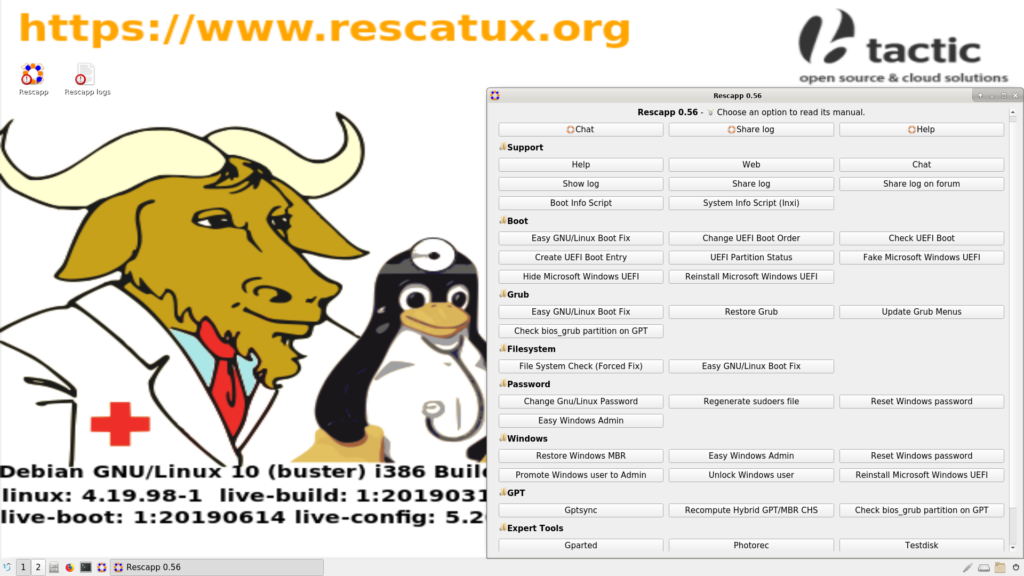
Rescatux is a Debian GNU/Linux based live cd aimed at GNU/Linux and Microsoft Windows rescue tasks thanks to its graphical wizard named Rescapp.
Rescatux 0.74 stable version has been just released is available for you to download.
Check Rescatux 0.73 release
If you already have Rescatux 0.73 there’s no need to download Rescatux 0.74.
This is a quick release with almost no changes so this piece of news will be quite short. Please check Rescatux 0.73 released piece of news for the full detail of what Rescatux has in it.
The original idea was to work on Super Grub2 Disk but I just realised that I had to update the official Super Grub2 Disk irc channel… and, guess what, Rescatux also uses IRC so it needed a quick update.
I have almost not tested this Rescatux version. Was it not to work for you please try Rescatux 0.73 instead. Feedback on stuff that it previously worked ok on Rescatux 0.73 but it no longer works in Rescatux 0.74 on the github issues page is welcomed.
USB DEVICE: Please use Etcher (or dd carefully if you are an expert) to flash the iso to your usb device (Warning: The complete usb device is erased). Other methods based on external tools that put many ISOs into a single usb are discouraged and not supported because it’s not easy that the resultant USB will support all the as-is Rescatux supported systems.
CDROM or DVDROM: Burn the iso with k3b, brasero, nero burning rom, or your favourite burning tool (it fits under 700 MiB).
Rescatux 0.73 hands on – Mini tutorial where Easy GNU/Linux Boot Fix option is featured
You can watch the Rescatux 0.73 hands on video where you will find a mini tutorial on how to use Rescatux 0.73. Easy GNU/Linux Boot Fix option is featured.
Main changes
The last Rescatux stable version was released on October 2012. That’s about eight years ago.
Many changes have happened to Rescatux since then. UEFI options which became mainstream at 2015 have been added. Secure Boot support has been added. Rescapp is now its own program.
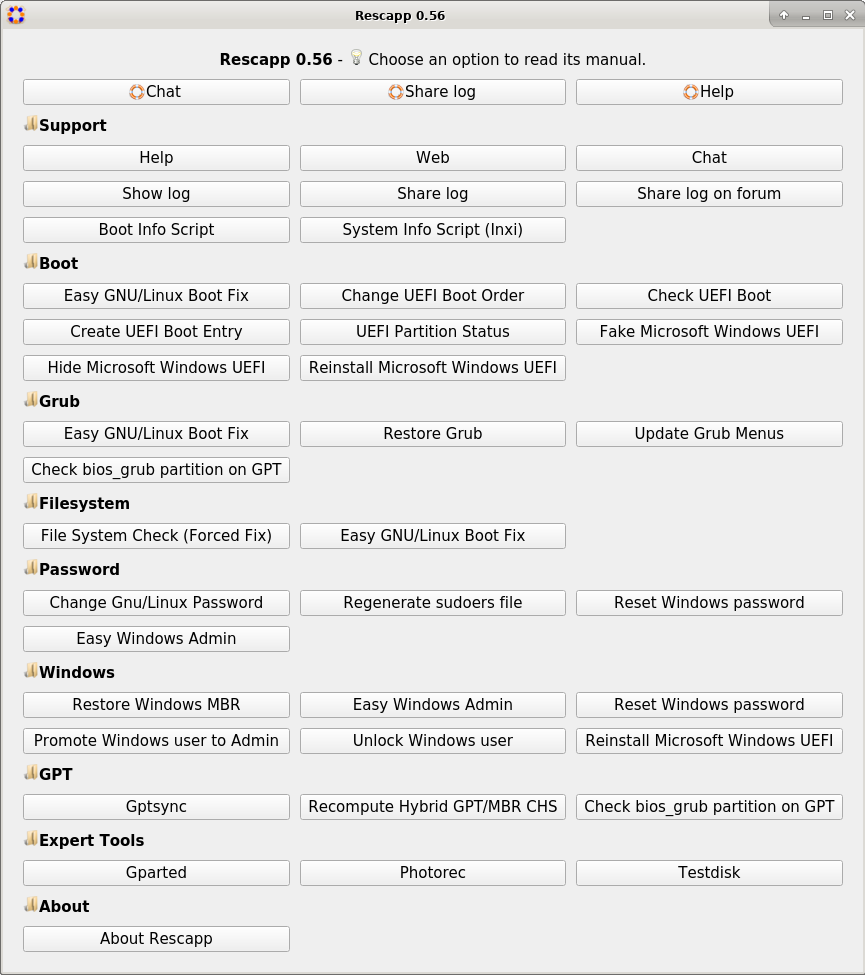
Rescapp 0.56 main menu featured at Rescatux 0.73
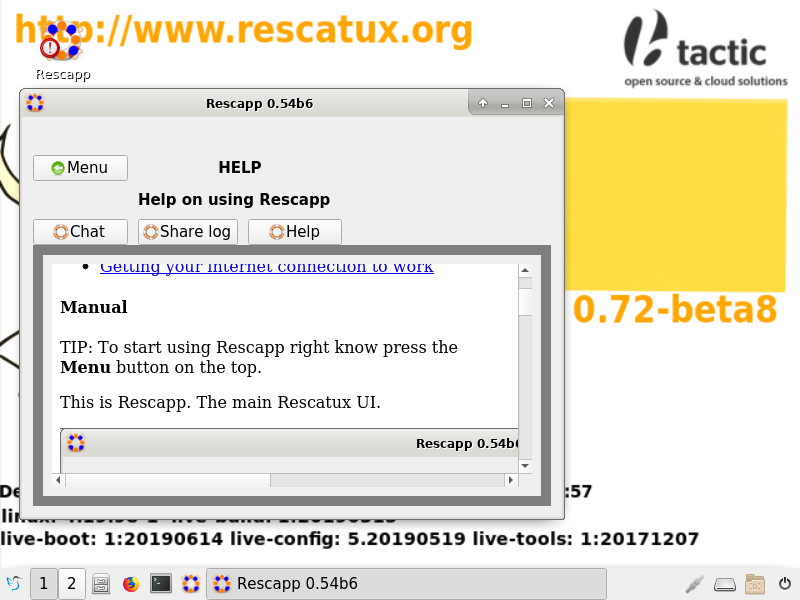
Rescapp had some serious usability flaws that have been fixed. When you run an option you never knew if it was working ok. Now you have an status for the option.
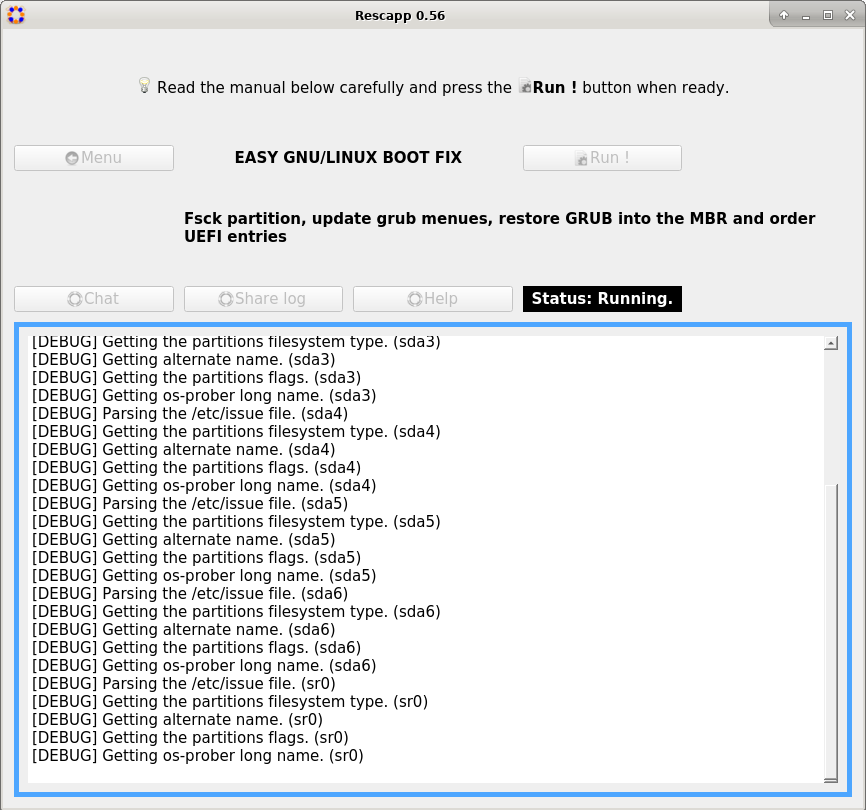
Rescapp 0.56 – Status label shows that the Easy GNU/Linux boot option is being run
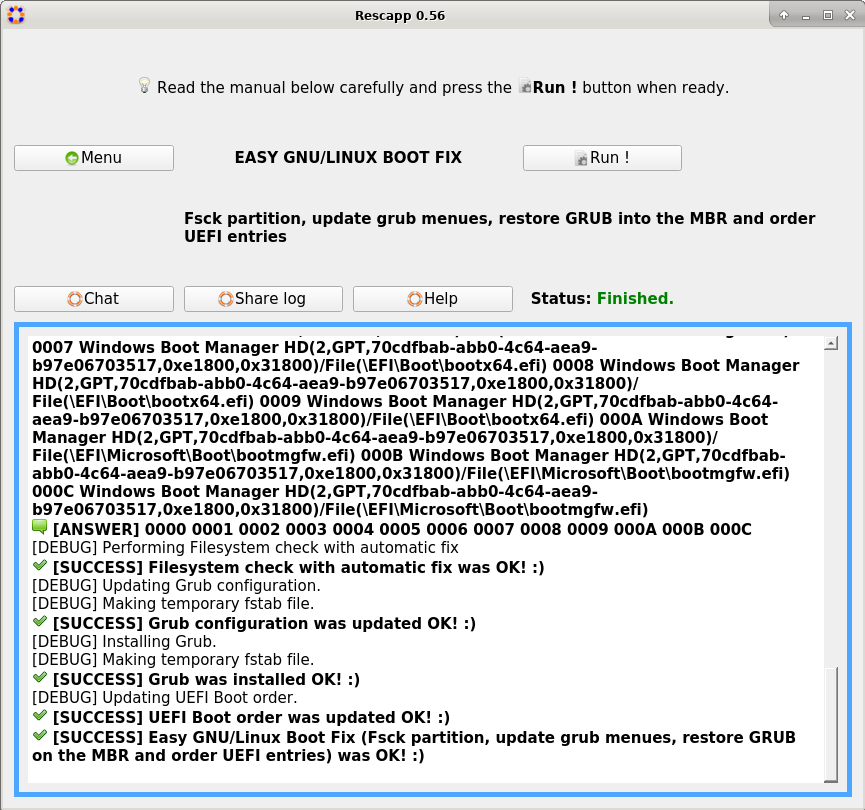
Finally the complete nightmare of pop-ups that were shown when an option is run have been replaced by nice coloured scrolling messages.
Rescapp 0.56 – Nice scrolling coloured messages show what the option does
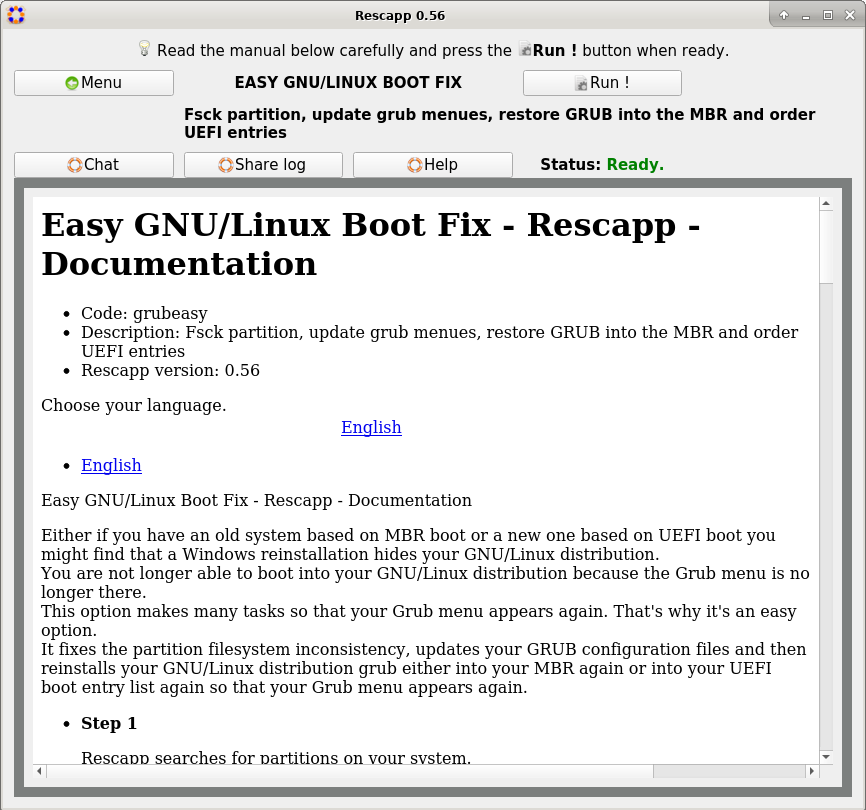
One of the best improvement has been done recently. Rescapp has been improved so that every option is properly documented (as well as a non native English speaker can write).
Not only every question explains all the steps that it performs and the questions they are going to make but some scenarios are explained so that you can understand what’s the most suitable scenario when to use the option.
Rescapp 0.56 – Now every option has its own documentation with examples of use
Features
Rescatux 0.73 supports booting from UEFI Secure Boot and traditional BIOS. Both amd64 and 686 systems are supported.
Rescatux
includes Rescapp, a graphical rescue tool that will assist users to
regain access to a computer that has become non-bootable among many
other features.
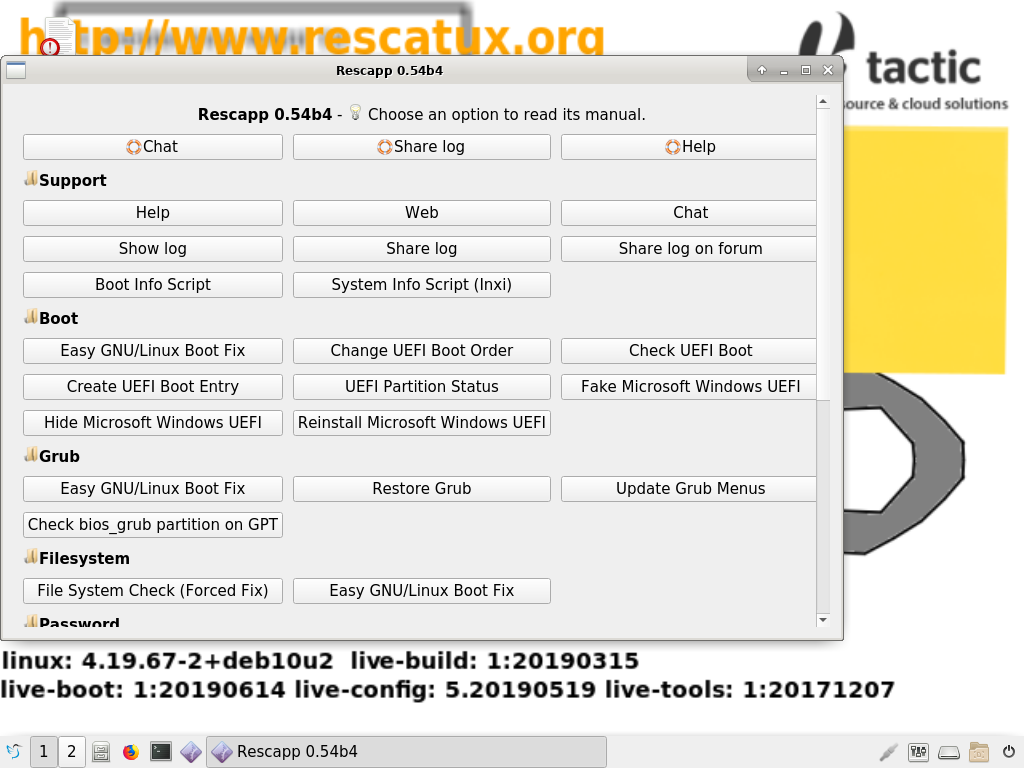
GNU/Linux options
Change Gnu/Linux Password : Change a user’s password
File System Check (Forced Fix) : File System Check (Forced Fix)
Easy GNU/Linux Boot Fix : Fsck partition, update grub menues, restore GRUB into the MBR and order UEFI entries
Restore Grub : Restore GRUB into the MBR
Regenerate sudoers file : Define a new sudoers file
UEFI Partition Status : Check UEFI partition status
Check UEFI Boot : Check if Rescatux has boot in UEFI mode
Create UEFI Boot Entry : Create a new UEFI Boot entry out of your EFI files
Change UEFI Boot Order : Change UEFI Boot order
Reinstall Microsoft Windows UEFI : Reinstall Microsoft Windows UEFI boot entries
Fake Microsoft Windows UEFI : Fake Microsoft Windows UEFI boot entry
Hide Microsoft Windows UEFI : Hide Microsoft Windows UEFI boot entry and define default fallback one.
Windows password and role related options
Easy Windows Admin : Promote to Admin, Reset Windows (NT,200x,XP,Vista,Seven) password and unlock user
Reset Windows password : Reset Windows (NT,200x,XP,Vista,Seven,10) password
Promote Windows user to Admin : Promote Windows (NT,200x,XP,Vista,Seven,10) user to Administrator
Unlock Windows user : Unlock Windows (NT,200x,XP,Vista,Seven,10) user
Other options
Boot Info Script : Boot Information Script
Check bios_grub partition on GPT : Check if there is a bios_grub partition on a GPT disk
Gptsync : Create an hybrid MBR inside a GPT partition (Gptsync)
Recompute Hybrid GPT/MBR CHS : Recompute CHS values on an hybrid GPT/MBR partitiont table
Restore Windows MBR : Restore generic MBR code so that Windows boots again
System Info Script (Inxi) : System Info Script (Inxi)
Support features
Chat : Get online human help (chat)
Help : Help on using Rescapp
Share log : Share Rescatux logs. It generates a pastebin in paste.debian.net and shows it to you so that you can copy and paste the url in the chat.
Share log on forum : Share Rescatux logs on a forum. It generates a temporary file ready to copy and paste on your favourite forum (ubuntuforums.org and others).
Show log : Show Rescatux logs so that you can ask help and supporters can know what happens when you run Rescatux options
Web : Access online Rescatux website
External tools
Gparted : GParted is a free partition editor for graphically managing your disk partitions.
Testdisk : Testdisk is a text wizard drive program for rescuing disks, partitions, and files.
Photorec : Photorec is a text wizard drive program for rescuing files. Despite its name it recovers much more files than photo files.
What’s new on Rescatux (since Rescatux 0.72-beta8)
Grub menu recovers Auto entry.
Grub menu boots into Auto entry in 60 seconds.
Built source code now includes rescapp and chntpw packages.
Stable version.
What’s new on Rescapp (since Rescatux 0.72-beta8)
Rest of the plugins documentation has been updated to match 2019 gui.
Removed tooltips from main menu.
Added initial useful explanations on options documentation.
Disable action buttons when an option is run.
UEFI options now show the final user when the backup of EFI directory fails.
README reorganisation.
Stable version.
Known bugs
Graphical interface is not shown if you have newest Amd videocards from 2020
Encrypted partitions need to open manually via the CLI (if they are ever needed in order to rescue your system). That’s not strictly a bug but a non-fullfilled request for enhacement (RFE).
Feedback and support
Rescatux is designed in such a way that you can use it on your own offline by just reading its help. Although the documentation could be much better written.
I am unable to keep a proper forum up right now. So if you have any question or suggestion I recommend you to open a new issue in the Rescapp issue tracker. Please before opening a new issue check if your problem was already was asked and solved in the Rescapp issue tracker question labeled issues.
You can also ask for help on the integrated Rescatux irc channel. Hopefully someone will be online.
cjg67 for his incredible work on packaging Rescapp to Arch and Fedora. (BTW one of these days I need to add a page dedicated to Rescapp where I feature those packages.)
eris23 from linuxtracker community who has uploaded many times the Rescatux isos to the torrent site.
Many anonymous users which create new bugs at rescapp issues page.
Many anonymous users which came back to the Rescatux chat after trying our given advice in the chat
Alf Gaida (agaida) on the many times he has helped me on integrating LXQt to Rescatux.
A: Before Grub2 was the norm there was Grub which was able to edit minimally your system (install grub on the mbr). I develop a GUI around it named Super Grub Disk, later on I improved it by modifying its source code. But then Grub2 started to be used by default in many distributions. Super Grub2 Disk was born, a GUI around Grub2 but, guess what, it couldn’t install grub on the mbr. So a live cd was needed and I started to tinker with Rescatux around 2010.
Q: For those people that still do not know Rescatux, can you please explain what Rescatux is?
A: It’s a Debian GNU/Linux based live cd aimed at rescue tasks. It features Rescapp a graphical wizard for helping to recover your system.
Q: Why did you choose the Rescatux name?
A: In Spanish it might mean Rescate Linux. And in English Rescue a Tux computer. I also wanted one single name (contrary to the three words from Super Grub2 Disk).
Q: Who’s in charge of the development?
A: Most of the development is done by me, adrian15. Many people have helped all along these almost ten years.
Q: What’s the Rescatux target audience?
A: GNU/Linux newbies such as Ubuntu users in 2015 and MX Linux users in 2020. It’s also targeted to repair technicians and, of course, distro hoppers.
Q: What are the main difficulties on developing Rescatux?
A1: Lack of time.
A2: When I’m able to build on Debian 9, then Debian 10 appears and I have to rethink all of it.
A3: live-build, one of the Debian tools for making live cds was not as good as I needed it to be and I needed to improve it, then push back the changes to upstream.
A4: Getting useful feedback from people who uses Rescatux (even having an integrated chat) is difficult.
A5: Nobody has steped in to add CI/CD and check if Rescatux always fixes the same problems. We would need something similar to what ReactOS and Tails do on their projects.
A6: Lack of contributors. This is not a tool where, as a developer, you can learn useful skills for your everyday work unless you are GNU/Linux repair technician.
A7: I prefer QT but Gparted, Firefox and other projects are based on GTK and make Rescatux iso slightly bigger.
A8: UEFI, Secure Boot and what not. We live in a time where old BIOS systems and new UEFI systems are available. Both need to be supported and also Secure Boot. And trying to test Secure Boot in a virtual machine is not easy. You cannot use Virtualbox but you need to setup and user KVM/Qemu in special ways. And many UEFI firmwares are not very well programmed.
Q: What are the main collaborations or help you received on Rescatux ?
A: The most recent contributor is cjg67 which helped a lot on improving written English in Rescapp. It’s also nice that many Linux magazines write articles about it and even record DVDs with Rescatux in them.
Q: Can you tell us anything about the Rescatux future?
A: Rescapp, the main Rescatux program is stable. It might need some options reorganisation (feedback is welcomed) or some documentation rewriting. But it is stable. My mid term goal on Rescatux is bringing back my work on live-boot, live-build, liveid, chntpw (which I will fork), and rescapp back to Debian. If one such goal is achieved one could be able to install rescapp on a Debian live cd thanks to the apt-get command.
Pinging back the Press
ALL: How to test the iso. What really piss me off is those people which create a new empty virtual machine and start up Rescatux cdrom without any installed operating system in their virtual machine. This might be ok for your regular GNU/Linux distribution live cd but not for Rescatux. You are not going to enjoy how Rescapp recover your boot and al. Please setup a dual boot (e.g. Windows 10 and Ubuntu 18.04) environment and try to play with Rescapp boot options. Forget your GNU/Linux password on purpose. If you try the EFI mode in Virtualbox remember that you never have to power off the machine. Just reboot it from inside your installation or save the vm state and later on resume it. Else you might find out that you lose the your recently installed UEFI menu. Finally if you are expert enough try to setup a KVM/Qemu with actual Secure Boot instead.
ALL: More than Rescapp. You might be tempted to skip the boot menues and the Rescatux startup wizard in your explanations because the useful thing is Rescapp. Don’t miss the opportunity to talk about it because it ensures to be shown in the middle of two screens and allows Rescatux to be accessed via VNC. Change your keyboard and so on.
Distrowatch: Thank you for helping me to bring Rescatux and Super Grub2 Disk to your audience. Rescatux is targeted at newbie Ubuntu users (which I guess that nowadays are the newbie MX Linux users), repair technicians and distro hoppers. Hopefully one day I can find time to develop a new standard based on rss so that you can keep track of new distribution releases in a semi-automated way. BTW if you come from Distrowatch weekly where this announcement is featured your feedback is welcomed in the DW comments. I’ll try to participate and solve doubts if anyone has them.
Linux Magazine: Thank you for making your 167 number Fast Help article free for everyone to read. Ferdinand Thommes (the article writer) came into the Rescatux irc channel back in the day for having updated feedback from us. It was nice meeting him.
Linux Magazine: Your 228 issue had a DVD with Super Grub2 Disk. The DVD label mockup should have had the version (2.04s1 or whatever) in addition to Super Grub2. E.g. Super Grub2 2.04s1. Anyways I’m grateful and at the same time amazed because this is about 17 MB burned into a 4.3 GiB DVD side !!! Once I manage to add Secure Boot support to Super Grub2 Disk I need to build an iso that features both SG2D and Rescatux so that not so much space is wasted.
Destination Linux: I watched your DL138 episode (48 minute). I liked Noah explanation on saying that when Grub does not boot it it’s usually a synthom that something else is bad. Hopefully one day you cover Rescatux release.
Carey Holzman: I enjoy watching you repairing computers. One of the last episodes I saw was LIVE – Tech-Vets show #150 where I learnt how the new worldwide state was being dealt in the U.S.A. and among computer repair men. I also enjoyed your rant on your wife employer not giving her a laptop and a separate internet connection. I guess Parted Magic (which it’s a paying product) is more suited for many of your tasks but it would be nice you could try Rescatux and give me some live feedback that I can use back to improve Rescatux usability or functionality. It’s usually hard for me to receive useful feedback. Usually people are in a hurry to use Rescatux and if it doesn’t work they switch to another solution.
MuyLinux: I sent you an email many years ago telling you that Rescatux was going to be released as an stable version very soon. It seems I lied to you XD. You have invited me many times to write an article about Rescatux (which I have declined because I preferred to work on improving Rescatux) but I think I will leave it to you. After all if I write it myself I might lose the opportunity on grasping how Rescatux is perceived by someone other than me.
Barrapunto: Hi kandinski! Hopefully one day you can surprise all of us and reopen the site. I miss writing in my own bitacora.
Message for the one who brings potatoes: This is a proud GNU/Linux distribution. I should write it down more often. Hopefully the GNU and Tux background makes you happy enough to forgive me not writing GNU/Linux after everytime I write Rescatux.
I have thought on bringing back my barrapunto bitacora back as meneame articles but I’m not quite convinced. Any replacement for Barrapunto that you recommend me? Thank you.
If you are commenting on a new Rescatux article on meneame make sure to ask your doubts there. I might be around and reply to them 😉 .
Linux Format: I enjoyed your Rescue distros roundup on LXF209 where Rescatux won. On LXF250 you mentioned that Rescatux was not maintained and that’s why it was not considered. I was disappointed till I checked that at that time (June 2019) latest Rescatux distribution release was from December 2017. Yes, I had done some internal builds from November 2018 where I tried once again to use LXQT but I hadn’t made it public, so, it didn’t exist. Funny enough on May 2019 (probably after the article was written) Rescatux 0.71-beta7 was released. Anyways Rescatux being perceived as disappeared encouraged me to work hard on it so that we finally had an stable release. So thank you!
Linux Format: Some notes on updating Rescue distros roundup from LXF209 to match Rescatux 0.73:
Tools repository: I removed the external Boot Repair tool although it has many tools. [No change.] (4/5)
Customisability: No one has shown interest in being able to build its own custom Rescatux so I haven’t worked on it. [No change.] (2/5)
User experience: Thanks to the new status frame where you can see what Rescapp does the usability is even better than before. [No change.] (5/5)
Support & rescue docs: The current documentation and videos on the website are aging a bit but a lot of work has been put into generating a proper inline documentation that you can read from Rescatux itself (without an internet connection). [No change.] (5/5)
Security features: Current iso also has GPGV and shred but I didn’t put them on purpose. Security is not a priority. You can drop one point if you want to. [-1] (1/5)
Custom tools and UIs: Yeah, now Rescatux not only has Rescapp but a Rescatux startup wizard which assists you to change display resolution, locale, vnc or keyboard layout. (6/5)… I mean… [No change.] (5/5) 😉 .
Healing capabilities: Boot Repair tool is no longer there but many UEFI options have been added. [No change.] (4/5)
The verdict [No change.] (5/5)
Linux Format: Tux with fingers should not be! you say. Not only I managed to show a penguin that almost drowned but I also made it more human by giving him fingers. I only will say that it made sense when I first thought about it XD. Rescatux background no longer features the humanoid-drowning-tux but a GNU and a Linux images. Website images, to your concern, won’t be updated in the short term, so you will see the humanoid-drowning-tux once in a while 😉 .
Linux Format: I checked the LXF259 DVD iso and you have a pretty nice system based on Grub. It supports booting from both BIOS and UEFI (IA32 and AMD64) systems. Congratulations! Super Grub2 Disk is less than 17 MB in size. I want to release an special ‘script’ release in the future so that you can just configfile its cfg which it’s the right way of using it.
Linux Format: On the LXF259 DVD iso you feature Rescatux. It’s nice how you can use your parser (aimed at live-build disks) and create a Rescatux boot entry. Can you please improve it by supporting loopback.cfg (and thus liveid)?
MX Linux: I know you have a tool named MX Boot Repair. It’s not easy to predict when I’ll be able to add Rescapp to Debian properly. It would be nice if you could evaluate Rescapp as a replacement for your MX Boot Repair. What features you are missing from it. And, maybe, if you need an special start switch so that only two or three options are shown to your live cd users. You can find Debian Buster based repo in Rescatux repo and you can also use the quick script on Non-free Rescatux documentation. And make sure the user which runs rescapp can sudo any command he wants to (as it usually happens in Live CDs).
What about the future
My plans on future development :
Unspecified pause
Soften Super Grub2 Disk AFD prank
Working on adding Secure Boot to Super Grub2 Disk
Maybe improving Rescapp documentation, release new stable Rescapp and Rescatux releases
Probably also releasing a Super Grub2 Disk version based on GNU/GRUB 2.06 version
Maybe work on a new Rescatux webpage
Update Rescatux images to remove Tux with fingers so that Linux Format magazine guys stop complaining (and because we have better background and logo designs right now 😉 )
Push live-boot liveid improvements back to Debian
Push live-build Rescatux improvements back to Debian
Work on Super Grub2 Disk script release so that Linux Format Guys can include a working version of Super Grub2 Disk on their multiarch enabled DVDs
Getting back Rescatux improvements on live-build and live-boot to upstream (Debian)
Fork chntpw properly into another name
Make chntpw fork a proper Debian package
Make rescapp non arch dependent (all package in Debian)
Make rescapp a proper Debian package
Release a Rescatux version based on Debian 11 (Bullseye)
Trying to push a graphical rescue flavour into Debian itself almost (but not better than) as good as Rescatux.
Release a Super Grub2 Disk and Rescatux all-in-one iso
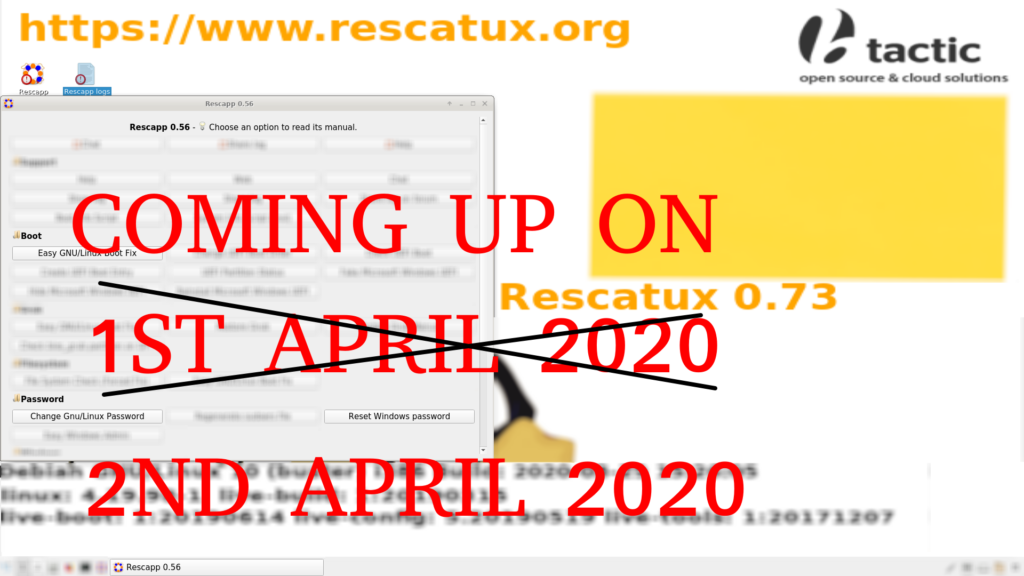
Rescatux 0.73 is coming up on 1st April 2020. Better not. It is coming on 2nd April 2020.
Rescatux 0.73 is coming up on 2nd April 2020!
Are you a professional Linux magazine/website article writer and you want to review Rescatux 0.73 before its official release? You can apply for your copy here.
This is another beta version of Rescatux. The last Rescatux beta was released on January 2020. That’s about one month ago.
This new version has many improvements. AFD Scanning technology has been improved with the United States of Spain gimmick. Rescapp now has proper logos, desktop icons and a window icon. Non English translations were removed from internal documentation. Many plugin documentations have been update to match 2019 gui. Finally the most important improvement is that Rescapp help is shown right at the Rescapp startup.
This is another beta version of Rescatux. The last Rescatux beta was released on December 2019. That’s about one month ago.
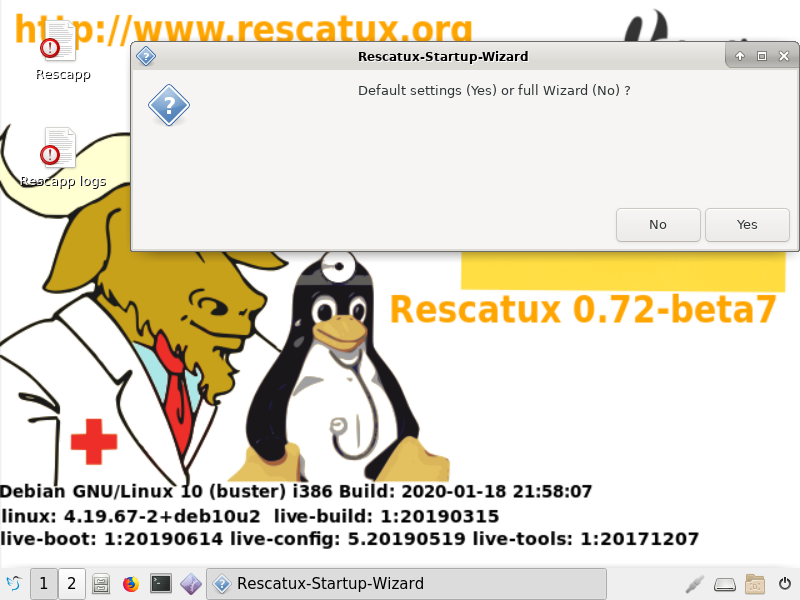
This new version has two major improvements. Startup wizard has an option to just use default values and skip all the questions. The second one is that options (the ones which hadn’t been reworked yet) have been reworked so that they manage devices like hard disks not being found properly.
Rescatux 0.72 beta 7 with the improved startup wizard
What’s new on Rescatux
Startup wizard has an option to just use default values
New 2019 December background
Enable customizations thanks to optional make_common.custom file.
What’s new on Rescapp
Removed no longer needed sip module dependency
Completed handling of not found partitions of files
This is another beta version of Rescatux. The last Rescatux beta was released on November 2019. That’s about three weeks ago.
This new version has two major improvements. Extra xorg packages have been added so that more videocards are supported in Rescatux without having to use the non-free Rescatux. The second one is that many options have been reworked so that they manage devices like hard disks not being found properly.
Added extra xorg packages to match official Debian live cd ones
What’s new on Rescapp
Minor inxi improvements
Check for Hexchat binary
Handle non found devices properly on many options
Known bugs
Unknown behavior when some steps fail (e.g. no hard disks are found) on some options.
We use cookies to ensure that we give you the best experience on our website. If you continue to use this site we will assume that you are happy with it.Ok